This HVAC service agreement template is an editable Excel workbook for organizing maintenance coverage, planned visits, pricing, responsibilities, and renewal dates.
Use the XLSX to review what is included, estimate annual service cost, identify date issues, and decide which agreements need scheduling or renewal attention.
How this template can help
- Keep covered equipment, maintenance scope, agreement dates, and ownership details together.
- Turn included labor and material estimates into an annual planning cost based on visit frequency.
- Identify upcoming active visits and agreements that need renewal review.
- Compare active annual price with estimated annual cost before approving or revising the scope.
What the workbook contains
How to get started
1. Save a working copy
Work from a copy. Replace the fictional sample entries in the editable cells without overwriting calculated columns. Limit customer, technician, equipment, and property-access details to what the team needs, and store the file with appropriate access controls.
2. Review the planning assumptions
Set planning assumptions first. On Assumptions, review Estimated labor rate per hour, Renewal review alert days, Upcoming visit window days, Earliest agreement date, and Latest agreement date. These values affect scope costs, summary counts, and review messages throughout the workbook.
3. Enter the agreement record
Keep each Agreement ID unique. On Agreements, enter the customer, covered equipment group, assigned technician, dates, visit frequency, annual price, description, responsibilities, and status. The configured frequency choices are Annual, Semiannual, Quarterly, and Monthly.
4. Add and verify the maintenance scope
Match scope items by Agreement ID. On Scope Items, enter the equipment, maintenance description, quantity, unit, total labor hours, total material cost, responsibility, and scope status. Confirm that Agreement Check says Matched, then review the calculated annual cost, estimated gross, date alerts, and Summary indicators.
Build a reviewable service agreement record
Start each record on Agreements with a unique Agreement ID. Record the customer, covered equipment group, assigned technician, start and end dates, next visit date, renewal review date, visit frequency, annual price, and current status.
The Agreement Description, Contractor Responsibility, and Customer Responsibility fields help document operational expectations. Covered Equipment is a text field rather than a live asset register, so use a clear internal equipment label without adding unnecessary serial numbers, access codes, or sensitive property information.
Convert per-visit scope into an annual estimate
Each Scope Items line calculates Estimated Line Cost as total labor hours multiplied by the labor-rate assumption, plus total material cost. Quantity and Unit describe the line, but quantity is not separately multiplied into the cost formula. Enter Labor Hours (Total) and Material Cost (Total) as totals for that scope line.
Only Included scope contributes to Estimated Annual Cost. The workbook adds included line costs with the matching Agreement ID and multiplies that per-visit amount by Visits per Year. Optional and Excluded lines remain documented but do not enter this annual calculation.
Estimated Gross is Annual Price minus Estimated Annual Cost. It is a planning difference, not a net-profit or accounting-margin calculation.
Worked HVAC service agreement scenario
Assume fictional agreement FIC-SA-101 has Quarterly frequency, which maps to four visits per year. The labor-rate assumption is $98.00 per hour. One included task uses 1.50 labor hours and $22.00 of materials, producing a $169.00 line cost. A second included task uses 0.75 labor hour and $12.00 of materials, producing an $85.50 line cost.
Workbook result: The included per-visit estimate is $254.50. Multiplied by four planned visits, Estimated Annual Cost is $1,018.00. If Annual Price is entered as $1,800.00, Estimated Gross is $782.00.
The $782.00 result shows the difference between entered price and the workbook's included labor-and-material estimate. Before approving the price, review whether the scope omits travel, overhead, unusual access time, or other costs that this workbook does not separately calculate.
Use dates, status, and review alerts correctly
The default Assumptions use a 60-day renewal review window, a 30-day upcoming-visit window, and agreement-date boundaries of 01/01/2021 through 12/31/2036. Review these values before relying on the Summary.
The Review Alert formula checks required dates, date values, date order, configured boundaries, and whether the renewal review date falls within the agreement term. Rows labeled Review due or Review soon feed the renewal count on Summary.
Review Alert is a workbook prompt, not a notification. Agreement Status is selected manually from Draft, Active, On Hold, Expired, or Canceled. The workbook does not automatically change status, contact a customer, or schedule a technician.
Read the Summary before taking action
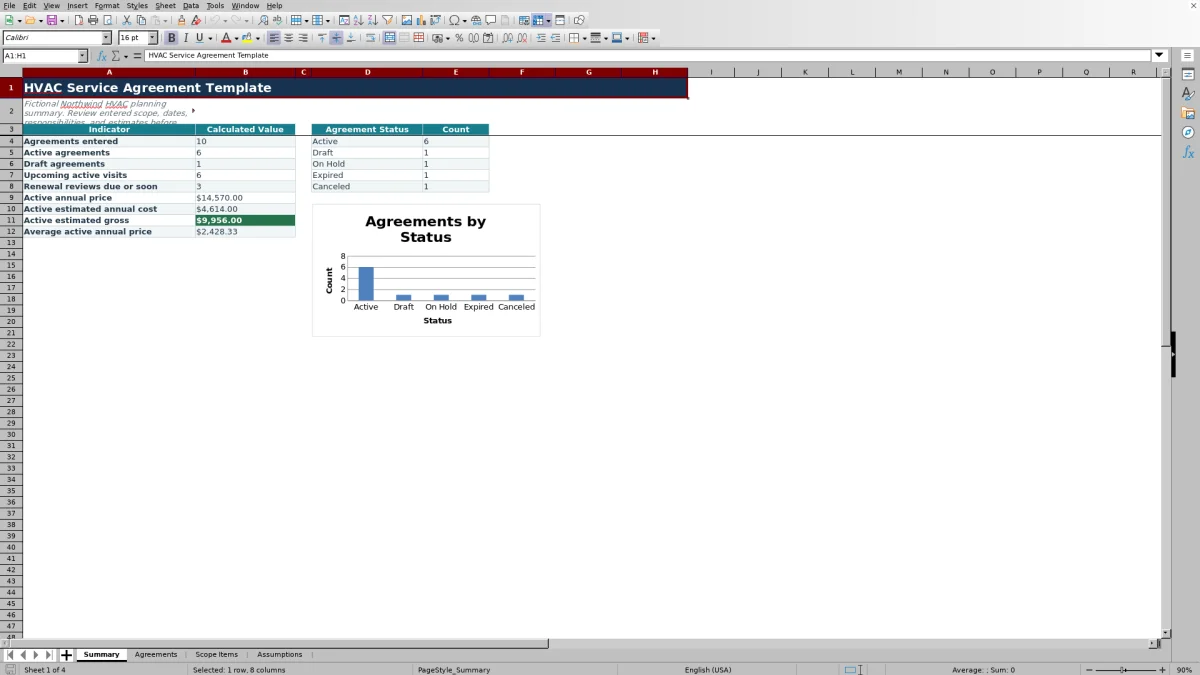
Summary counts entered agreements and separates Active, Draft, On Hold, Expired, and Canceled records. Its chart displays those status counts. Upcoming active visits counts Active rows with a Next Visit Date from the current date through the configured upcoming-visit window; overdue dates are not included in that indicator.
Active Annual Price adds Annual Price only for Active rows. Active Estimated Annual Cost and Active Estimated Gross use the corresponding calculated values, while Average Active Annual Price divides total active price by the number of active agreements.
If there are no Active agreements, the active financial totals and average may appear blank by design. Confirm the Status entries before interpreting a blank as missing pricing, then use the visit and renewal counts to decide which records need scheduling or customer review.
Fix common workbook errors
Do not overwrite calculated columns. On Agreements, Visits per Year, Estimated Annual Cost, Estimated Gross, and Review Alert contain formulas. On Scope Items, Estimated Line Cost and Agreement Check are calculated.
- If Agreement Check says Check agreement ID, make the Scope Items ID exactly match one Agreements ID.
- If Agreement Check says Check duplicate ID, remove or revise the duplicate agreement record so the ID appears once on Agreements.
- If Estimated Annual Cost is blank, check the Agreement ID, Visit Frequency, and calculated cells. If it is zero, confirm that included scope lines contain labor-hour or material-cost totals.
- If Estimated Line Cost is zero, remember that a blank labor or material input is treated as zero when an Agreement ID is present.
- If Review Alert calls for a date check, enter real Excel dates and verify the start, end, next-visit, and renewal-review sequence against the configured date range.
Workbook Comparison for service agreement tracking
| Practical criterion | This Excel workbook | Blank spreadsheet | Field-service management system |
|---|---|---|---|
| Initial structure | Includes agreement, scope, assumptions, and summary worksheets with prefilled formulas. | Requires the user to design fields, formulas, and checks. | Structure and setup requirements vary by system. |
| Cost planning | Calculates included per-visit labor and material cost, annual estimated cost, and estimated gross. | Calculations must be created and tested by the user. | Estimating and agreement-cost features vary by product and configuration. |
| Date follow-up | Provides in-workbook date checks, upcoming-visit counts, and renewal-review indicators. | Requires custom formulas or manual review. | Scheduling and notification capabilities vary and should be verified before selection. |
| Operational reach | Stores and calculates entered XLSX data but does not dispatch technicians or send messages. | Depends entirely on what the user builds. | May support broader service workflows, depending on the selected system. |
| Practical fit | Fits structured review within the workbook's 100 agreement rows and 100 scope-item rows. | Fits users who want to design every field and calculation themselves. | Worth evaluating when live dispatch, multiuser workflow, or system integrations are required. |
Choose this workbook when an editable file and its verified planning calculations fit the task. Use a blank sheet when the workflow must be built from scratch, or evaluate a dedicated system when the team needs operational functions beyond a standalone XLSX.
Limits to review before approval
Planning limit: Estimated Annual Cost includes only labor and material values entered on Included scope lines, multiplied by the mapped visits per year. It does not separately model actual job costs, travel, overhead, subcontractors, parts markup, or work performed outside the listed scope.
This workbook organizes operational information; it is not a complete legal contract, engineering design, equipment-sizing tool, safety procedure, accounting record, or proof of code compliance. Have qualified personnel review technical scope, safety requirements, customer terms, and pricing decisions as appropriate.
The XLSX does not collect signatures, process payments, monitor equipment, send renewal reminders, or maintain a dispatch schedule. Save an identified copy before changing an approved record if the team needs to preserve the earlier version.
Frequently asked questions
Does the workbook calculate the annual agreement price?
No. Annual Price is a manual entry on Agreements. The workbook calculates Estimated Annual Cost from included scope items and visit frequency, then subtracts that estimate from Annual Price to produce Estimated Gross.
Why is an estimated cost blank or zero?
A blank annual cost can result from a missing Agreement ID, missing or unmatched Visit Frequency, or an overwritten calculated cell. A scope line can calculate as zero when its labor hours and material cost are both blank or zero. Also confirm that the scope status is Included, because Optional and Excluded lines do not contribute to the annual estimate.
Can this Excel template be used as a signed customer contract?
The workbook can organize scope, equipment, responsibilities, dates, and price for review, but it is not a complete legal agreement or electronic-signature tool. Review customer-facing terms separately before issuing or signing an agreement.
Will the workbook send visit or renewal reminders?
No. Review Alert and Summary display indicators inside the workbook based on entered dates and the current date when formulas recalculate. They do not send emails, text messages, calendar events, or dispatch notices.
Can the visit-frequency choices be changed?
The configured choices are Annual, Semiannual, Quarterly, and Monthly, mapped to 1, 2, 4, and 12 visits per year. If you change the labels or mappings, review both the Assumptions reference entries and the Agreements list validation so the selections continue to match.
Editorial responsibility

Mara KeeneService operations editor

Owen CalderEstimating and controls editor