This HVAC labor cost calculator is an Excel workbook for estimating the annual loaded field-labor cost of a technician or crew profile.
Enter wages, paid hours, overtime, payroll burden, productive hours, and a target margin to calculate loaded cost per productive hour and a planning labor price.
How this template can help
- Converts regular wages, overtime wages, and payroll burden into annual loaded labor cost.
- Spreads annual loaded cost over productive hours for estimating and rate review.
- Applies a target labor margin to calculate a planning price per productive hour.
- Summarizes labor profiles, annual costs, productive hours, and overtime share.
What the workbook contains
How to get started
1. Review the planning assumptions
Replace the fictional assumptions first. On the Assumptions worksheet, confirm Default payroll burden, Default overtime multiplier, and Default target labor margin. Also review the entry limits and date range used by the workbook's validations.
2. Enter each labor profile
Use one row per technician or crew profile. In Labor Calculator, complete the applicable orange input cells from Effective Date through Margin Override %. Enter 0 in Overtime Hrs/Yr when no overtime is planned; leaving that field blank prevents the annual loaded cost from calculating.
3. Review the calculated fields
Columns L through N show the burden, overtime multiplier, and margin applied to the row. Columns O through T calculate wage costs, burden, annual loaded cost, loaded cost per productive hour, and planning labor price. Check the Human Check field before using a result.
4. Inspect the overall labor plan
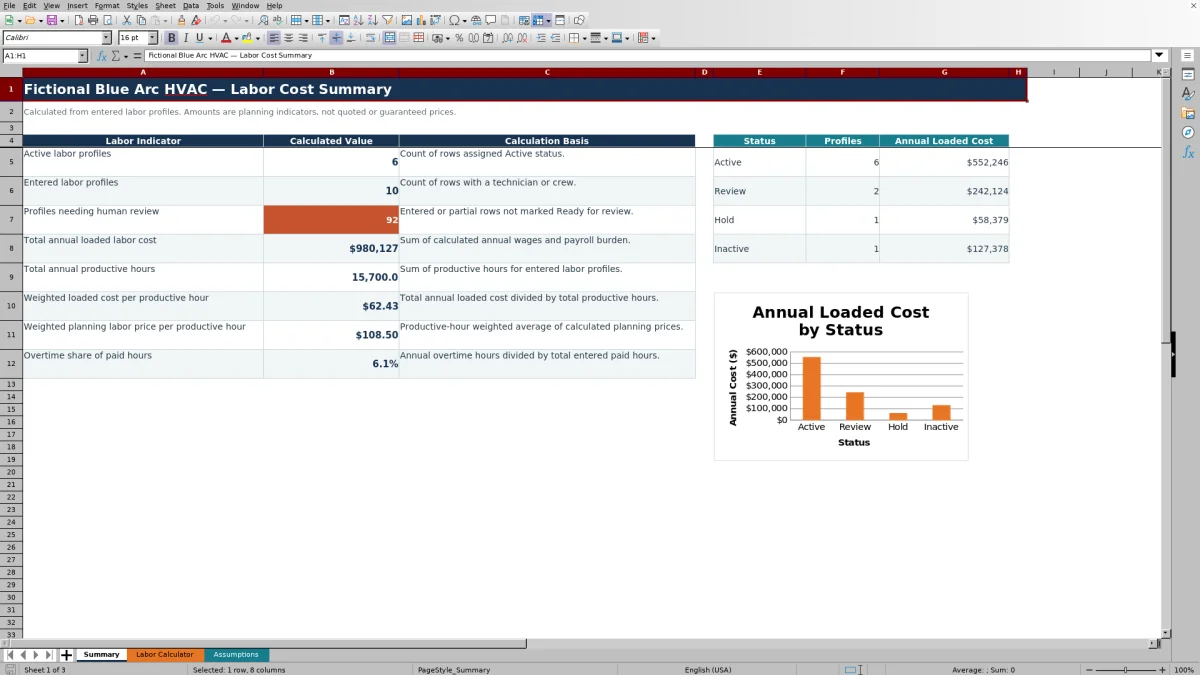
Use the Summary for review, not as a quote. It reports profile counts, total annual loaded cost, productive hours, weighted hourly results, overtime share, and annual loaded cost by status.
How the labor calculations work
Regular Wage Cost equals Base Wage ($/hr) multiplied by Regular Paid Hrs/Yr. Overtime Wage Cost equals base wage multiplied by Overtime Hrs/Yr and the applied overtime multiplier.
Payroll Burden Cost applies the selected burden percentage to the combined regular and overtime wage costs. Annual Loaded Cost is the sum of those wages and payroll burden. The workbook then divides that annual cost by Productive Hrs/Yr.
Planning Labor Price / Productive Hr divides loaded cost per productive hour by one minus the applied margin. This is a margin calculation, not a markup calculation. For example, a 40% target margin means labor cost represents 60% of the calculated planning price.
Worked HVAC labor cost scenario
Assume a fictional service technician earns $32.00 per hour, has 2,080 regular paid hours, 100 overtime hours, and 1,600 productive hours per year. Leave the overrides blank so the row uses the fictional defaults of 30% payroll burden, a 1.50 overtime multiplier, and a 40% target labor margin.
- Regular wage cost: $32.00 × 2,080 = $66,560.
- Overtime wage cost: $32.00 × 100 × 1.50 = $4,800.
- Payroll burden: ($66,560 + $4,800) × 30% = $21,408.
- Annual loaded cost: $66,560 + $4,800 + $21,408 = $92,768.
- Loaded cost per productive hour: $92,768 ÷ 1,600 = $57.98 per productive hour.
- Planning labor price: $57.98 ÷ (1 − 40%) = $96.63 per productive hour.
The result indicates the cost assigned to each planned productive hour and the price implied by the selected margin. Before carrying the planning price into an estimate, confirm that the productive-hours forecast, payroll burden, and target margin reflect the intended labor profile.
Using defaults and row-level overrides
Blank entries in Burden Override %, OT Multiplier Override, and Margin Override % use the corresponding values from Assumptions. This makes the defaults useful for profiles that share one planning policy.
An entered zero is different from a blank override. For example, a 0% burden override applies no burden to that row; it does not return to the default. Review zero entries carefully before relying on the result.
Changing a default updates calculated rows that have blank overrides. A row with its own override continues to use that override. Save an identified copy before revising assumptions if you need to preserve an earlier planning basis.
Choosing productive hours
Paid hours are not the same as productive hours in this workbook. Regular Paid Hrs/Yr and Overtime Hrs/Yr calculate wage expense. Productive Hrs/Yr is the user-entered quantity over which annual loaded cost is spread.
If productive hours decrease while wages and burden remain unchanged, loaded cost per productive hour increases. If productive hours increase, the calculated hourly cost decreases. The workbook does not derive productive hours from time records, schedules, vacation, training, callbacks, or travel; the estimator must prepare and verify that input.
Use a consistent definition across profiles so the weighted Summary rate remains meaningful. Revisit the input when staffing, non-job time, or expected utilization changes.
Statuses, Human Check, and Summary results
The Status field accepts Active, Review, Hold, or Inactive. Summary counts profiles and totals Annual Loaded Cost for each status, and its chart displays those status cost totals.
Status does not remove a profile from the overall annual cost and productive-hour totals. The grand totals use entered technician or crew rows regardless of status, so resolve Review, Hold, or Inactive rows before treating the Summary as an approved labor plan.
Human Check can identify missing profile names, labor descriptions, statuses, or assumption issues. Summary counts entered or partial rows that are not marked Ready for review. With no entered profiles, some summary results remain blank. If names are present but required cost inputs are incomplete, a total can appear as $0 while Human Check still identifies unfinished rows.
Common errors and practical corrections
Annual cost is blank: Confirm Technician / Crew, Base Wage ($/hr), Regular Paid Hrs/Yr, and Overtime Hrs/Yr. Use 0 rather than a blank overtime entry when no overtime is planned.
Loaded Cost / Productive Hr is blank: Enter a positive Productive Hrs/Yr value. A blank or zero denominator produces no hourly result.
Planning Labor Price is blank: Check the loaded hourly cost and applied margin. A margin that makes one minus the margin equal zero cannot produce a price.
Excel rejects an entry: Review the minimum and maximum values or date boundaries on Assumptions. The labor input fields use those assumption values for validation.
Human Check says Check assumptions: Look for missing assumption values or a minimum that exceeds its corresponding maximum before reviewing the labor rows again.
Comparison with a blank spreadsheet
| Criterion | HVAC Sheets workbook | Blank spreadsheet |
|---|---|---|
| Starting structure | Three prepared worksheets for labor profiles, assumptions, and summary review. | The user must design the fields and worksheet structure. |
| Calculations | Prepared formulas cover regular wages, overtime, burden, loaded hourly cost, and planning price. | The user must build, test, and maintain each formula. |
| Entry controls | Includes date, status, and numeric validations tied to assumption limits. | Controls depend on what the user chooses to create. |
| Review capacity | Supports up to 100 profile rows with summary indicators and a status cost chart. | Capacity and summary reporting depend on the custom design. |
| Practical fit | Fits a manual, repeatable labor-cost planning process using the provided calculation method. | Fits a business that needs a completely custom model and can maintain its logic. |
Choose this workbook when its wage, overtime, burden, productive-hour, and margin structure matches the estimating task. Start with a blank spreadsheet when the required cost model differs materially or needs fields and calculations that are not present here.
Workbook limits and information handling
This XLSX is a planning aid. Its verified scope does not include job-hour estimating, time capture, payroll processing, accounting entries, customer billing, payment processing, live system monitoring, or automatic messages.
Payroll burden is a user-supplied planning percentage. The workbook does not determine which payroll taxes, insurance, benefits, or other labor-related costs belong in that percentage. Confirm the basis with the appropriate business or accounting resource.
Technician names and wage information are sensitive. Store the file in an access-controlled location, limit shared copies, and remove fictional examples before entering actual profiles. The calculations do not establish legal, tax, licensing, safety, or code compliance.
Frequently asked questions
Does the workbook calculate a customer billing rate?
It calculates Planning Labor Price / Productive Hr from loaded cost and an applied target labor margin. Treat that figure as a planning input, not a final customer billing rate or quote. The workbook does not add job-specific hours, materials, equipment, subcontractors, taxes, or other estimate components.
What happens when I leave an override blank?
A blank burden, overtime multiplier, or margin override uses the corresponding default from Assumptions. An entered zero is treated as an actual override, so review zero values rather than assuming they will trigger the default.
Why is the loaded hourly cost blank?
Check that the row has a technician or crew name, base wage, regular paid hours, overtime hours, and productive hours. Enter zero for overtime when appropriate. Productive hours must be greater than zero for the workbook to divide annual loaded cost into an hourly result.
Does changing a profile to Inactive remove it from Summary totals?
No. Status separates profile counts and annual loaded cost by Active, Review, Hold, and Inactive, but the overall annual cost and productive-hour totals include entered profiles regardless of status. Clear or otherwise manage rows intentionally if they should not be part of the planning total.
Can one row represent a crew instead of one technician?
Yes. The Technician / Crew field supports either description. Use wage and hour inputs that consistently represent the selected unit, and avoid mixing a single-person wage with crew-level hours unless that is the intended cost basis.
Editorial responsibility

Mara KeeneService operations editor

Owen CalderEstimating and controls editor