This HVAC boiler replacement estimate Excel workbook organizes line-item pricing for equipment, pumps, piping, controls, removal, labor, and material allowances.
Use the XLSX for scope and pricing review: update contractor assumptions, identify responsibility, set each line's status, and inspect the calculated summary before presenting an estimate.
How this template can help
- Build an estimate from quantities, unit material costs, and labor hours per unit.
- Keep included scope separate from optional, excluded, and pending-review items.
- Apply editable category markups or a line-specific markup override.
- Identify unresolved status decisions through the Summary sheet's human-check count.
What the workbook contains
How to get started
1. Save a clean working copy
Preserve the original XLSX, create a job-specific copy, and replace the fictional entries. On Estimate Lines, update Customer, Job, Estimate Date, Technician, and Equipment. Store the file securely because those fields may contain customer, employee, and equipment information.
2. Review assumptions before pricing
Open Assumptions and review the Labor rate, Default markup, category markups, entry limits, and choice lists. These are contractor inputs. The workbook's validation rules restrict certain entries, but they do not confirm that a rate, allowance, or labor estimate is reasonable for the job.
3. Enter the replacement scope
Use Estimate Lines rows 10 through 109. Enter the Category, Description, Quantity, Unit, Material Unit Cost, Labor Hours / Unit, Responsibility, and Status for each item. Use Markup Override only when a line needs a different rate. Enter data in the editable cells and do not overwrite calculated columns such as Labor Hours, Material Cost, Labor Cost, Total Cost, Applied Markup, or Estimated Price.
4. Resolve scope and review the summary
Assign every described line a status. Use Included for base-estimate scope, Optional for add-ons, Excluded for work outside the price, and Pending Review for unresolved items. Then inspect Summary for included cost, price, labor hours, gross margin, excluded lines, and human checks.
Build the boiler replacement scope line by line
Separate the job into items that can be priced and reviewed independently. Typical entries may cover the boiler package, circulator pumps, near-boiler piping, controls, startup labor, and removal. The Description field remains free-form, while Category and Unit use lists maintained on Assumptions.
The workbook has seven category positions on Assumptions. If you need a dedicated Removal category, edit one category entry and its default markup before entering estimate lines, then review any rows that used the former label. There is no separate disposal-cost field. If disposal charges are carried in Material Unit Cost on a removal line, document that treatment in the description so another reviewer can understand the allowance.
Understand how each estimate line is priced
The calculation starts with contractor-entered quantities, costs, and labor assumptions:
- Labor Hours equals Quantity multiplied by Labor Hours / Unit.
- Material Cost equals Quantity multiplied by Material Unit Cost.
- Labor Cost equals Labor Hours multiplied by the Labor rate on Assumptions.
- Total Cost adds Material Cost and Labor Cost.
- Applied Markup uses Markup Override when one is entered. Otherwise, it uses the category markup or falls back to Default markup if the category lookup is not found.
- Estimated Price equals Total Cost multiplied by one plus Applied Markup.
Estimated Price remains blank when required inputs are incomplete or Status is blank. It is also intentionally blank for an Excluded line. Remember that markup and gross margin percentage are different: a 25% markup on cost produces a 20% gross margin when no other amounts are involved.
Worked boiler replacement estimate scenario
Consider a fictional boiler room estimate using a $120 labor rate. Assume category markups of 25% for Boiler and Pump, 28% for Piping, 30% for Controls, and 20% for a contractor-created Removal category. Every line is marked Included.
- One boiler with $15,000 of material and 18 labor hours produces $17,160 of total cost and a $21,450 estimated price.
- Two pumps at $900 each and 3 labor hours per pump produce $2,520 of total cost and a $3,150 estimated price.
- One piping allowance with $2,500 of material and 16 labor hours produces $4,420 of total cost and a $5,657.60 estimated price.
- One controls allowance with $1,200 of material and 8 labor hours produces $2,160 of total cost and a $2,808 estimated price.
- One removal line with $600 of direct charges and 12 labor hours produces $2,040 of total cost and a $2,448 estimated price.
Summary would show 60 included labor hours, $28,300 of included cost, a $35,513.60 included estimate, $7,213.60 of gross margin, and a 20.3% gross margin percentage. The result indicates what the entered assumptions produce; it does not confirm the scope. The next decision is to verify supplier pricing, labor allowances, responsibility, and disposal treatment. If removal is unresolved, move that line to Pending Review instead of leaving it in the included price.
Use status and responsibility for scope decisions
Status controls where a priced line appears. Included lines feed the base estimate, included cost, included labor hours, gross margin, and included category totals. Optional and Pending Review lines retain an estimated price but appear in separate Summary amounts. Excluded lines have no Estimated Price and are counted separately.
Responsibility records Contractor, Customer, or Shared, but responsibility does not change price or determine whether a line is included. Review it alongside Status. For example, a customer-responsible electrical item should not remain Included merely because Responsibility says Customer.
The Human Checks Needed result counts Pending Review lines plus described lines with no status. It does not identify every missing quantity, cost, labor, category, or responsibility entry.
Read the Summary before presenting the estimate
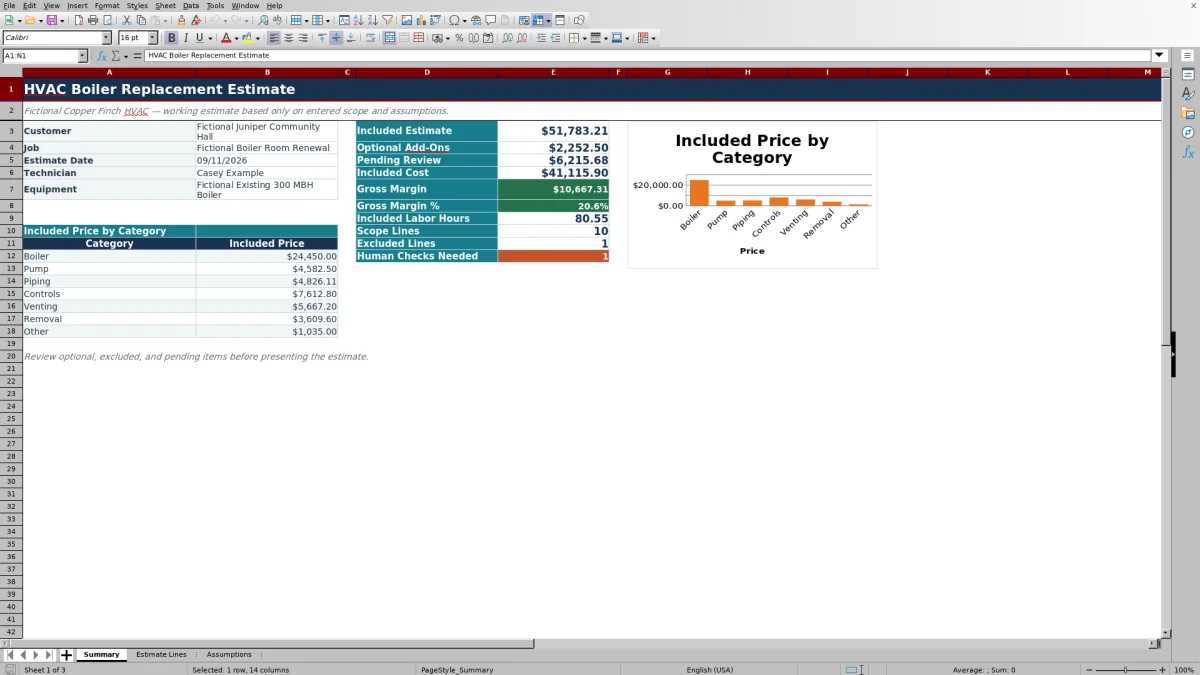
Summary brings over the Customer, Job, Estimate Date, Technician, and Equipment fields from Estimate Lines. It then separates Included Estimate, Optional Add-Ons, and Pending Review amounts. Included Cost contains the material and labor costs from Included lines, while Gross Margin subtracts that cost from the included estimate.
Scope Lines counts rows with descriptions. Excluded Lines counts the rows marked Excluded, and Included Labor Hours totals labor only for Included rows. The Included Price by Category area and its chart help show where the base estimate is concentrated.
A blank optional or pending amount means no lines currently use that status. With no Included lines, included totals and margin may also be blank. If incomplete lines are already marked Included, a zero may reflect missing calculations rather than a finished zero-dollar estimate. Review the line details before interpreting it. Gross Margin is estimate price minus entered material and labor cost; it is not accounting net profit.
Correct common estimate errors
- Blank Estimated Price: confirm that Description, Category, Quantity, Material Unit Cost, Labor Hours / Unit, and Status are present. Also confirm that the Assumptions labor rate and applicable markup are available.
- Excluded line has no price: this is intentional. Change Status only if the item should be Included, Optional, or Pending Review.
- Excel rejects an entry: the value may exceed an editable limit on Assumptions, fall outside the permitted estimate-date range, or not match a category, unit, responsibility, or status choice. Review the applicable assumption rather than bypassing validation without checking the entry.
- Unexpected markup appears: inspect Markup Override first, then the category markup and Default markup on Assumptions.
- Summary does not match visible filtered rows: the Summary formulas evaluate all estimate rows, including rows hidden by the Estimate Lines filter.
- A calculation was replaced: return to a clean workbook copy and restore the affected formula structure before relying on totals.
Workbook Comparison: Excel and Other Approaches
| Criterion | This Excel workbook | Blank spreadsheet | Field-service platform |
|---|---|---|---|
| Starting structure | Three prepared sheets and 100 estimate rows | User creates the layout and formulas | Varies by system and configuration |
| Pricing logic | Quantity, material, labor, and markup calculations are included | User defines and tests the calculations | Available calculations vary; verify before use |
| Scope review | Included, Optional, Excluded, and Pending Review statuses | User designs a review method | Workflow and statuses vary by system |
| Operational reach | Self-contained estimate workbook without verified messaging, payment, or live-system functions | Limited to whatever the user builds | May support broader workflows depending on the selected product |
Choose this workbook when you need an editable, self-contained Excel estimate with defined pricing and status logic. Start with a blank spreadsheet when the structure must be fully custom and you are prepared to build and test it. Evaluate a field-service platform when shared dispatch, communications, payments, or other connected workflows are required, and verify its actual capabilities before deciding.
Know what the estimate does not determine
This workbook is a pricing aid, not a design or compliance tool. It does not size a boiler, perform a load calculation, design hydronic piping, evaluate venting or combustion, verify controls sequences, approve equipment selection, or prove code, permit, safety, licensing, tax, accounting, or environmental compliance.
It also does not compare estimate figures with actual job costs or provide verified alerts, integrations, approvals, or version history. Pricing is only as current as the entered supplier costs, labor rate, hours, scope, and markups. Obtain qualified technical review where needed, verify disposal and subcontractor requirements, and save clearly identified copies when an approved estimate changes.
Frequently asked questions
Can this workbook estimate pumps, piping, controls, and boiler removal?
Yes. Enter each scope item on a separate Estimate Lines row with its quantity, material unit cost, labor hours per unit, responsibility, and status. Boiler, Pump, Piping, and Controls are present in the editable category list. A category position can be adapted for Removal if needed, but review its markup and any rows that used the previous label.
How are optional and pending items handled?
Optional and Pending Review lines calculate an estimated price and appear in separate Summary totals. They are not added to Included Estimate. Pending Review lines also increase Human Checks Needed so unresolved scope remains visible.
Why is an estimated price blank?
A line price stays blank when required inputs are incomplete, the status is missing, or the line is marked Excluded. Check the description, category, quantity, material cost, labor-hours input, labor rate, markup, and status.
Does the markup percentage equal gross margin percentage?
No. Markup is applied to line cost, while gross margin percentage divides the difference between included price and included cost by included price. For example, a 25% markup on cost produces a 20% gross margin when no other amounts affect the calculation.
Does the Excel estimate size the replacement boiler?
No. The Equipment field and line descriptions record estimating information only. The workbook does not perform load calculations, select capacity, verify a hydronic design, or establish code and safety requirements.
Can the workbook track estimate revisions automatically?
No revision log or version-history workflow is present in the workbook. Save a clearly named copy before changing an approved scope or pricing baseline so the earlier estimate remains available for comparison.
Editorial responsibility

Mara KeeneService operations editor

Owen CalderEstimating and controls editor