This HVAC Sheets XLSX is a planning estimate for pricing a heat-pump installation. It organizes equipment, line-set material, electrical work, labor, allowances, and other scope as estimate lines.
Set internal rates and review limits, mark each line Included, Optional, or Excluded, and use the Summary to decide whether the estimate is complete enough for review.
How this template can help
- Keeps the default labor rate, markup, contingency, and internal review limits in one assumptions worksheet.
- Separates Included, Optional, and Excluded lines so options do not change the main estimated total.
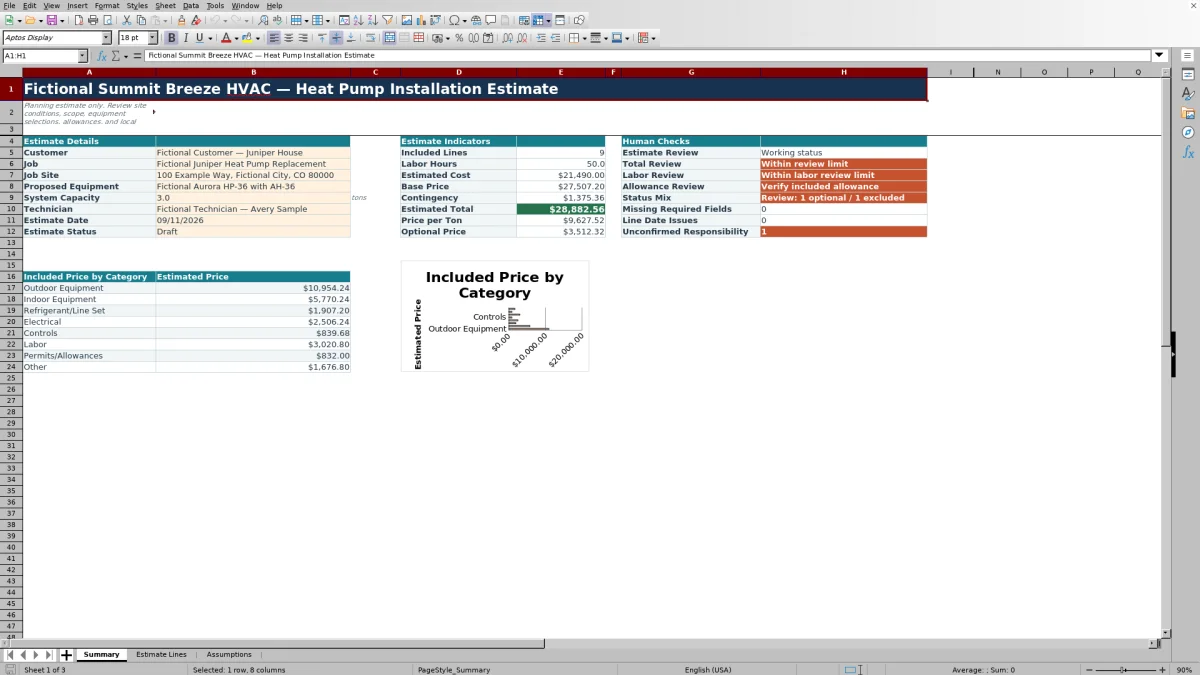
- Summarizes labor hours, estimated cost, base price, contingency, total price, price per ton, and optional price.
- Surfaces missing required fields, line-date issues, unconfirmed responsibility, and totals that cross review limits.
What the workbook contains
How to get started
1. Save and prepare a working file
Save a working copy before editing the fictional sample. Clear only the intended orange input cells, and preserve the formulas in column A and columns J through M on Estimate Lines.
2. Review the estimating assumptions
On Assumptions, set the Default Labor Rate, Default Markup, Contingency, High Total Review Limit, and Project Labor Review Limit for your internal estimating process. Also review the quantity, per-line labor, unit-cost, capacity, and date boundaries in B10:B16. These are planning controls, not engineering or code limits.
3. Enter the job details
On Summary, replace the fictional customer, job, site, proposed equipment, system capacity, technician, estimate date, and status. Use MM/DD/YYYY for the date. Limit access to copies containing customer, employee, property-access, equipment, or pricing information.
4. Build the estimate lines
On Estimate Lines, enter the date, category, item, description, quantity, unit, labor hours, unit cost, responsibility, and status. Use Included for scope that belongs in the main estimate, Optional for separately presented choices, and Excluded for documented scope that is not priced in the total.
5. Review the Summary before changing status
Resolve the Missing Required Fields, Line Date Issues, and Unconfirmed Responsibility counts. Review the included category amounts, optional price, total, labor hours, and allowance message before changing Estimate Status to Ready for Review.
Translate the installation scope into estimate lines
Start with the field scope rather than a single lump-sum price. Estimate Lines provides categories for Outdoor Equipment, Indoor Equipment, Refrigerant/Line Set, Electrical, Controls, Labor, Permits/Allowances, and Other.
Use the Equipment / Item and Description fields to identify what each amount covers. Quantity and Unit establish the pricing basis, while Labor Hours captures the time assigned to that line. Responsibility records whether the contractor, customer, or an unresolved party is expected to handle the work.
Review scope ownership before pricing. A line marked To Be Confirmed is counted on Summary, but the workbook does not resolve the responsibility or contact anyone. The estimator must confirm the scope and update the line.
Understand the workbook pricing sequence
For a populated line, the workbook pulls the Default Labor Rate and Default Markup from Assumptions. Estimated Cost equals quantity multiplied by unit cost, plus labor hours multiplied by the labor rate. This combines the entered item cost and calculated labor cost for that line.
Estimated Price equals the estimated line cost multiplied by one plus the markup. As provided, the same default markup applies to the entire line cost, including its labor component.
Summary adds Estimated Cost and Estimated Price only for lines marked Included. The included estimated prices become Base Price. Contingency is calculated from that base price, and Estimated Total is the base price plus contingency. Price per Ton divides the estimated total by the entered System Capacity; it is a pricing ratio, not an equipment-sizing result.
Worked heat-pump estimate scenario
In this fictional example, an estimator uses a $120 labor rate, 25% markup, and 5% contingency. The proposed system capacity is entered as 3 tons. Three complete lines are marked Included.
- Outdoor Equipment: one unit at $7,200 plus 6 labor hours produces a $7,920 estimated cost and a $9,900 estimated price.
- Indoor Equipment: one unit at $3,200 plus 5 labor hours produces a $3,800 estimated cost and a $4,750 estimated price.
- Electrical: one planning allowance at $900 plus 4 labor hours produces a $1,380 estimated cost and a $1,725 estimated price.
The workbook returns 15 included labor hours, $13,100 of estimated cost, and a $16,375 base price. The 5% contingency is $818.75, producing a $17,193.75 estimated total. Dividing that total by 3 tons returns $5,731.25 per ton. The estimator can use that ratio for an internal reasonableness review, then investigate scope or pricing if it differs materially from comparable jobs.
A fictional thermostat option with a $300 unit cost and 1 labor hour produces a $525 estimated price at the same rate and markup. Marking it Optional places $525 in Optional Price without adding it to the $17,193.75 total. Because the electrical amount is categorized as Electrical, Allowance Review still reports No included allowance; that check looks specifically for an Included Permits/Allowances line. The next decision is whether a separate permit or fee allowance belongs in the scope.
Use Summary indicators as a review queue
The Summary indicators combine calculated totals with human checks. Total Review compares Estimated Total with the High Total Review Limit. Labor Review compares included labor hours with the Project Labor Review Limit. Crossing a limit prompts review; it does not reject or approve the estimate.
- Estimate Review responds to the selected Estimate Status. Ready for Review produces a reminder to review the estimate details.
- Allowance Review checks for an Included line in the Permits/Allowances category.
- Status Mix counts Optional and Excluded entries so they are not overlooked during scope review.
- Missing Required Fields counts incomplete required entries rather than identifying or correcting them.
- Line Date Issues counts populated estimate lines dated outside the boundaries set on Assumptions.
- Unconfirmed Responsibility counts described lines marked To Be Confirmed.
Use these messages as a queue. Return to Estimate Lines, correct the affected inputs, and then confirm that the Summary has recalculated as expected.
Fix common estimate errors
- Blank totals: A described line may be missing required inputs. Check the Missing Required Fields count, then inspect the line date, category, item, quantity, unit, labor hours, unit cost, responsibility, and status.
- Blank line price: Estimated Cost requires Description, Quantity, Labor Hours, and Unit Cost. Enter zero where zero labor or zero unit cost is intentional rather than leaving the required input blank.
- Unexpected zero total: Confirm that at least one complete line is marked Included. A file containing only Optional or Excluded lines can return a zero included total.
- Rejected input: Quantity, labor hours, unit cost, capacity, and dates are subject to validation boundaries. Review the corresponding Assumptions control before changing a boundary for a legitimate estimating need.
- Incorrect or missing formulas: Pasting across a whole row can overwrite line-number or calculation formulas. Restore them from an untouched workbook copy and verify several line calculations before relying on the total.
Workbook Comparison for estimate workflows
| Criterion | This HVAC Sheets workbook | Blank spreadsheet | Field-service or estimating platform |
|---|---|---|---|
| Initial structure | Three prepared worksheets for assumptions, estimate lines, and summary review. | The user must design the fields, formulas, validation, and review layout. | Structure varies by product and configuration. |
| Pricing calculations | Includes line cost, markup, contingency, category totals, optional price, and price-per-ton formulas. | The user must create and test each calculation. | Available calculations and pricing rules must be verified for the selected system. |
| Scope treatment | Uses Included, Optional, and Excluded line statuses plus responsibility choices. | Requires a custom method for scope status and ownership. | Terminology and workflow vary by system. |
| Automation and integrations | No verified messaging, live supplier pricing, payment processing, or accounting integration. | Not inherent to a newly created blank worksheet. | May be available depending on the product, plan, and setup. |
| Practical fit | A defined, editable XLSX for a contractor who wants a standalone planning estimate. | A flexible starting point for someone prepared to build and maintain the workbook. | A possible fit when broader scheduling, customer, or transaction workflows are required and verified. |
Choose this workbook when its line structure and calculation method match the estimating task and staff can control the XLSX manually. Use a blank spreadsheet when a substantially different calculation model is required. Evaluate a dedicated platform when the job depends on verified multiuser workflow, integrations, or operational functions not present here.
Know what the estimate does not decide
This workbook is a planning aid. It does not calculate a building load, select heat-pump capacity, certify equipment compatibility, design electrical or refrigerant systems, establish code requirements, determine permits, or provide engineering approval. System Capacity is a user input used for the price-per-ton calculation.
Entered unit costs and allowances are static workbook inputs. The XLSX does not obtain supplier quotes, monitor price changes, apply a separate tax calculation, send alerts, create invoices, process payments, or post records to an accounting system. Confirm current equipment, material, labor, permit, and subcontractor amounts outside the workbook before issuing a price.
No version-history feature is built into the workbook. Save an identified copy before changing an approved estimating baseline. Remove unnecessary customer, employee, property-access, equipment-serial, vendor, and pricing details before sharing the file, and manage access according to your business practices.
Frequently asked questions
Do Optional and Excluded lines affect the estimated total?
No. Summary calculates Estimated Cost, Base Price, contingency, and Estimated Total from Included lines. Optional estimated prices are shown separately in Optional Price, while Excluded lines are not added to either price total.
Where does the workbook apply contingency?
The Contingency percentage on Assumptions is applied to the included Base Price after line markup. The resulting contingency amount is then added to Base Price to calculate Estimated Total.
Can each estimate line use a different labor rate or markup?
As provided, populated lines pull the same Default Labor Rate and Default Markup from Assumptions. A line-specific method would require carefully adapting the formulas in a separate copy and testing the line totals, Summary totals, and copied formulas before use.
Can I change the category or status dropdown choices?
The delivered dropdowns use fixed validation choices. The reference lists displayed on Assumptions do not establish that editing those labels will update the validation rules. If you modify the validation in Excel, also review the Summary category formulas because they depend on exact category names.
Does this workbook track actual costs, invoices, or payments?
No. Estimate Lines contains estimated cost and estimated price fields, but the workbook has no actual-cost, invoice, payment, or accounting-posting workflow. Use an appropriate operational or accounting record for those tasks.
Does the workbook determine the correct heat-pump size or prove compliance?
No. It records a proposed equipment description and system capacity for estimating purposes. It does not perform load calculations, equipment selection, field verification, code review, permit approval, or engineering analysis. Those decisions require the applicable qualified review outside this workbook.
Editorial responsibility

Mara KeeneService operations editor

Owen CalderEstimating and controls editor