This Excel workbook gives an estimator a scope-first estimate for a mini-split installation. It prices entered equipment, line sets, accessories, and labor from editable quantities, costs, labor hours, and assumptions.
Use the XLSX to separate included, optional, excluded, and review items, then inspect the calculated Summary before presenting a price. The workbook supports estimating decisions; it does not verify system design or site requirements.
How this template can help
- Separates included scope from optional, excluded, and unresolved estimate items.
- Converts quantities, unit material costs, and labor hours into calculated line prices.
- Summarizes included material, labor, contingency, total price, and price per indoor unit.
- Keeps the labor rate, material markup, contingency, and review thresholds editable.
What the workbook contains
How to get started
1. Create a job-specific copy
Save a working copy, then replace the fictional customer, job, date, technician, and sample line information on Estimate Lines. Clear editable input cells rather than deleting prepared formula columns.
2. Confirm the pricing inputs
Review Assumptions before pricing the job. Enter the standard labor rate, material markup, contingency, labor-hours review threshold, and line-set length review threshold. Enter markup and contingency as percentages, such as 25% rather than 25.
3. Enter the installation scope
Use one scope item per row in Estimate Lines. Complete Item Type, Equipment / Item, Description, Quantity, Unit, Unit Material Cost, Labor Hrs / Unit, Responsibility, and Line Status. The prepared area runs from row 9 through row 108.
4. Resolve checks and read the result
Review every message in Human Check, using the filter if needed. Then inspect Summary for included costs, contingency, optional pricing, excluded-item count, indoor-unit count, and the review signal before changing the manual Estimate Status.
Turn the site scope into estimate lines
Start with the physical and labor scope identified for the job. Enter outdoor and indoor equipment, line-set footage, accessories, and any separate labor activity on individual rows. Quantity and Unit should describe the same basis used by Unit Material Cost and Labor Hrs / Unit.
Description activates the prepared row. If it is blank, the workbook leaves the row number and calculated fields blank, and Summary does not count it as an entered line. For included indoor-unit counting, enter Indoor unit in Equipment / Item; a different description such as Bedroom head will not match that summary criterion.
Responsibility identifies HVAC Contractor, Customer, or Other Trade. It helps document scope ownership, but it does not transfer costs or create a separate allowance.
Understand the mini-split estimate calculations
For each active row, material cost equals quantity multiplied by unit material cost. Labor hours equal quantity multiplied by labor hours per unit, and labor cost equals those hours multiplied by the standard labor rate from Assumptions.
Estimated Price adds marked-up material cost to labor cost. In practical terms, the formula is material cost multiplied by one plus the material markup, plus labor cost. The markup applies to material, not labor. Summary then applies contingency to the combined price of Included rows.
An Excluded row returns a blank estimated price. Missing quantity, material cost, labor hours, labor rate, or markup can also leave a calculated amount blank. The prepared columns do not provide a separate manual sell-price override for each line.
Worked three-zone installation scenario
Consider a clearly fictional three-zone estimate. All four rows are marked Included and assigned to the HVAC Contractor:
- One outdoor unit at $2,600 material and 4.00 labor hours.
- Three indoor units at $600 each and 2.00 labor hours per unit.
- 90 ft of line set at $6.50 per ft and 0.08 labor hour per ft.
- One accessory kit at $350 and 2.50 labor hours.
With a $115 hourly labor rate and 25% material markup, the inputs produce $5,335.00 of material cost and 19.70 labor hours. Labor cost is $2,265.50, and the included price before contingency is $8,934.25. A 5% contingency adds $446.71, giving an estimated total of $9,380.96.
Because the Equipment / Item entries identify three included indoor units, Summary returns an estimated price per included indoor unit of $3,126.99. That is a comparison indicator, not a capacity or profitability measure. The 90-ft line set is also above the fictional 50-ft review threshold, so inspect the Human Check result and verify the route, material allowance, and site conditions before presenting the estimate.
Control included, optional, excluded, and review scope
Line Status determines how a row is handled. Included rows feed the main Summary price. Optional rows are totaled separately, allowing the customer-facing scope decision to remain visible without adding that amount to the included total.
Excluded rows have no calculated estimated price and are counted separately. Needs Review rows can calculate a line price, but they are not part of the Included or Optional summary amounts. The Human Check column returns Review status for that selection.
Other prompts include Choose status, Complete inputs, and Check pricing assumptions. Threshold checks are review prompts only; they do not alter quantities, labor hours, or prices. Estimate Status is a manual choice among Draft, Reviewing, Ready to Present, and Closed, not an approval workflow.
Read the Summary without confusing cost categories
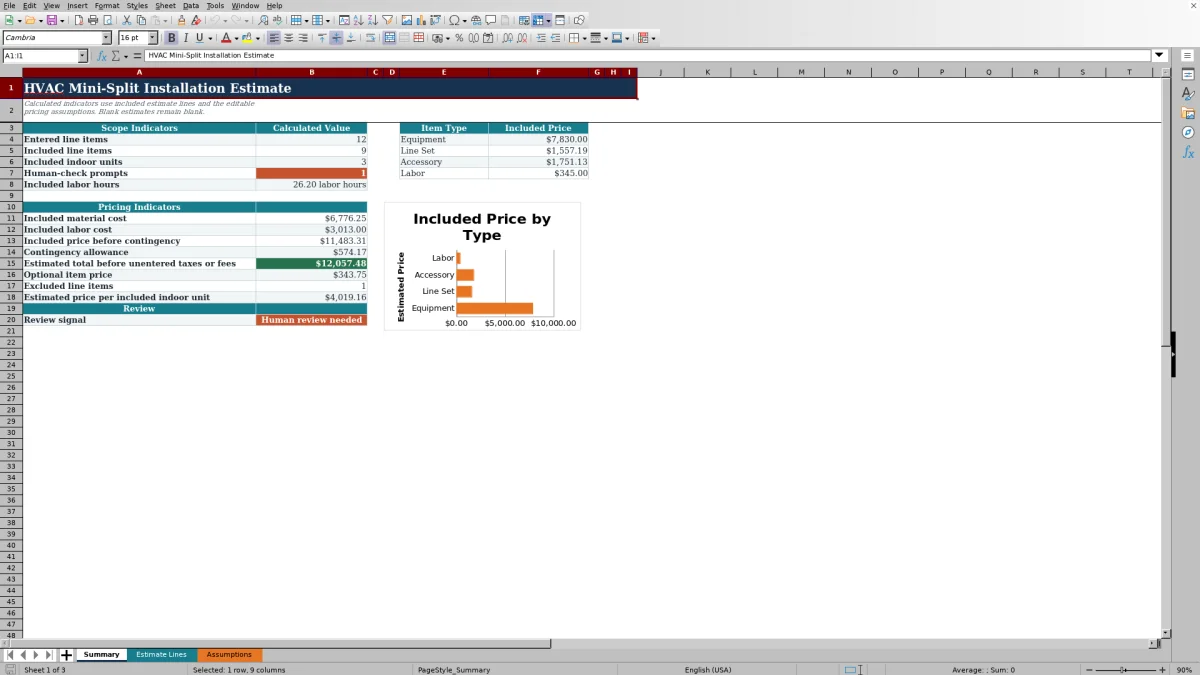
Summary separates included material cost, included labor cost, included price before contingency, contingency allowance, and estimated total before unentered taxes or fees. It also shows optional pricing, excluded-line count, included indoor-unit quantity, and estimated price per included indoor unit.
The item-type amounts and chart group Estimated Price by Equipment, Line Set, Accessory, and Labor. The Labor category represents rows classified with Item Type set to Labor. It is not the same as Included labor cost, which totals calculated labor cost from every included row.
If there are no Included rows, most pricing indicators remain blank rather than showing zero. Price per indoor unit also remains blank when no included Indoor unit quantity is found or that quantity is zero. Resolve the underlying scope or labeling issue instead of treating a blank as a confirmed $0 result.
Common estimate errors and practical fixes
- If a row does not calculate or appear in the entered-line count, complete Description first.
- If Human Check says Choose status, select Included, Optional, Excluded, or Needs Review.
- If it says Complete inputs, inspect Item Type, Equipment / Item, Quantity, Unit, Unit Material Cost, Labor Hrs / Unit, and Responsibility.
- If it says Check pricing assumptions, confirm the labor rate, markup, contingency, and both review thresholds on Assumptions.
- If price per indoor unit is blank, verify that included indoor-unit rows use Indoor unit in Equipment / Item and contain a positive quantity.
- If a numeric result is unexpectedly $0.00, confirm that a permitted zero was intentional; the quantity, cost, and labor input validations allow zero.
After correcting an input, recalculate the workbook if the Excel application is not using automatic calculation. Then review Summary again rather than relying only on the repaired line.
Workbook Comparison with a blank spreadsheet
| Criterion | HVAC Sheets workbook | Blank spreadsheet |
|---|---|---|
| Initial setup | Prepared estimate fields, formulas, assumptions, statuses, and summary indicators | User must design and verify the structure and calculations |
| Scope review | Included, Optional, Excluded, and Needs Review selections with a Human Check column | Depends on the fields and review rules the user creates |
| Pricing method | Uses quantity, material cost, labor hours, labor rate, material markup, and contingency | Can use any chosen method after formulas are built |
| Prepared capacity | 100 line-entry rows with formulas and validation through row 108 | User-defined, subject to the design and formulas added |
| Best fit | Repeatable mini-split estimates that match the workbook's pricing method | Unusual pricing workflows that require a custom structure |
Choose this workbook when its line-based material and labor method matches the way the job will be priced. Start from a blank spreadsheet when the estimate requires substantially different calculations and someone can build and verify them before use.
Limits to address before presenting the estimate
This workbook is an estimating aid. It does not perform a load calculation, select capacity, confirm equipment compatibility, approve line-set length, evaluate electrical work, verify code or permit requirements, or establish safe installation procedures.
The estimated total is before taxes or fees that have not been entered. Confirm current equipment and material costs, actual site access, routing, responsibility boundaries, local obligations, and final pricing outside the workbook as appropriate.
The verified formula and validation area ends at row 108, providing 100 prepared estimate lines. Rows added beyond that area are not confirmed to inherit the same formulas or controls. Save an identified copy before changing an approved scope because the workbook has no dedicated revision-history worksheet.
Customer, technician, property-access, serial-number, vendor, and pricing information should be limited to what the estimate needs. Store and share the XLSX using your company's access and retention practices.
Frequently asked questions
Can I use this workbook for single-zone and multi-zone estimates?
Yes, the line structure can record one or multiple indoor units, provided each scope item fits the prepared fields. Summary counts included quantities only when Equipment / Item is entered as Indoor unit. The workbook does not verify that selected indoor and outdoor equipment are compatible.
Does the workbook calculate sales tax, permit fees, or rebates?
No dedicated tax, permit-fee, or rebate calculation appears in the verified workbook. Summary labels the result as an estimated total before unentered taxes or fees. Add such items only through a reviewed estimating method appropriate to the job and your business.
Why is an estimated price or Summary result blank?
A blank may mean the description is missing, required quantity or cost inputs are incomplete, a pricing assumption is blank, the row is Excluded, or no lines are marked Included. Price per indoor unit also stays blank when the included indoor-unit quantity is missing or zero.
Can I add more than 100 estimate lines?
The prepared entry area contains 100 rows, from row 9 through row 108. Additional rows are outside the verified formula and validation ranges. If the scope exceeds that capacity, use another identified estimate or carefully extend and test the workbook before relying on new rows.
Does this Excel estimate size the mini-split system?
No. It prices entered scope and labor assumptions but does not calculate heating or cooling loads, select equipment, confirm manufacturer limits, certify a design, or prove code compliance. Use qualified technical review for those decisions.
Editorial responsibility

Mara KeeneService operations editor

Owen CalderEstimating and controls editor