This HVAC flat rate pricing calculator is an Excel workbook for turning task labor, parts, consumables, overhead, and margin assumptions into internal repair prices.
Use it as an internal pricing aid, not as a customer quote or invoice. The first 10 task rows contain fictional examples that should be replaced with your own reviewed inputs.
How this template can help
- Builds a repeatable flat-rate price from each task’s entered labor hours and direct costs.
- Applies shared labor, overhead, margin, rounding, and minimum-price assumptions across the catalog.
- Identifies incomplete, invalid, duplicate, overridden, and review-threshold task rows.
- Summarizes priced tasks and average prices overall and by service category.
What the workbook contains
How to get started
1. Review the pricing assumptions
Open Assumptions and update the loaded direct labor cost, overhead cost per labor hour, default target gross margin, price rounding increment, minimum flat-rate price, and review thresholds. Keep direct labor burden in the labor rate and general operating overhead in the separate overhead field. Continue when Assumption Status shows Assumptions valid.
2. Replace the fictional task examples
On Flat Rate Tasks, use the editable inputs in columns A through G and Q. Enter a unique Task ID, select a Service Category, describe the task, and provide Labor Hours, Parts Cost, and Consumables Cost. Target Margin Override and Notes are optional.
3. Read the calculated price
Columns H through O calculate the effective margin, labor cost, overhead allocation, total cost basis, price before rounding, flat-rate price, gross profit, and gross margin. Check Pricing Status in column P before treating a result as ready for internal use.
4. Review the catalog summary
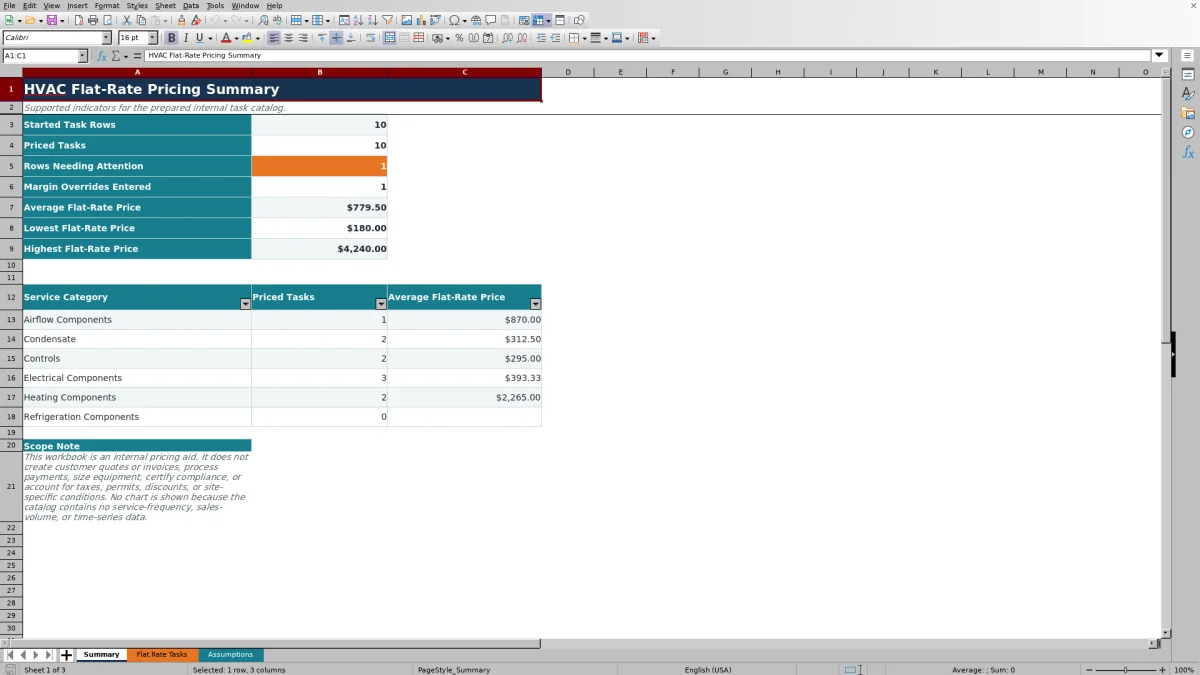
Use Summary to check started rows, priced tasks, rows needing attention, margin overrides, and overall price statistics. Review the category counts and averages, then return to Flat Rate Tasks to correct or investigate individual rows.
How the flat-rate calculation works
The workbook calculates Labor Cost by multiplying Labor Hours by Loaded Direct Labor Cost per Hour. It calculates Overhead Allocation by multiplying the same hours by Overhead Cost per Labor Hour. Those amounts are added to Parts Cost and Consumables Cost to form the Total Cost Basis.
Price Before Rounding equals Total Cost Basis divided by one minus the Effective Target Margin. Margin is not markup: with a 45% target margin, the cost basis is divided by 55%, not multiplied by 145%. Flat-Rate Price is then rounded up to the selected increment and cannot fall below the Minimum Flat-Rate Price.
Gross Profit is the flat-rate price minus the cost basis. Gross Margin is that gross profit divided by the flat-rate price. Missing required inputs or invalid assumptions leave pricing results blank; a blank price should not be interpreted as a zero-dollar task.
Worked fictional repair-price scenario
Assume a fictional repair task requires 1.5 labor hours, $80 in parts, and $10 in consumables. The fictional business assumptions are $42 per hour for loaded direct labor, $68 per labor hour for overhead, a 45% target gross margin, a $5 rounding increment, and a $125 minimum price.
- Labor Cost is 1.5 × $42, or $63.
- Overhead Allocation is 1.5 × $68, or $102.
- Total Cost Basis is $63 + $102 + $80 + $10, or $255.
- Price Before Rounding is $255 ÷ 0.55, or $463.64.
- Rounding up to the next $5 produces a $465 flat-rate price.
- Gross Profit is $210, and Gross Margin is approximately 45.2%.
The minimum price does not control this result because $465 is already above $125. If the row also has a unique ID, valid category, complete description, and acceptable inputs, Pricing Status can show Ready. The next decision is whether the task scope and entered costs are appropriate for the contractor’s internal catalog.
Using overrides and review thresholds
Leave Target Margin Override blank to use Default Target Gross Margin from Assumptions. Enter a task-specific override only when the task needs a different pricing target; valid overrides are limited to 10% through 80%. Effective Target Margin in column H shows which percentage the calculation uses.
The prepared assumptions include separate review thresholds for labor hours and parts cost. Rows beyond those thresholds can be marked Review input. That status is a prompt to check scope, time, and cost—not a prohibition on using the task.
Rounding and the minimum price can push the calculated gross margin above the target. Changing a shared assumption also recalculates every completed task row, so save an identified copy before making a broad change to an approved internal price list.
Pricing status errors and corrections
Use the status in column P to choose the correction:
- Assumption error: return to Assumptions and correct the highlighted value until B11 reports a valid status.
- Incomplete: complete Task ID, Service Category, Task Description, Labor Hours, Parts Cost, and Consumables Cost. The margin override and notes may remain blank.
- Invalid input: confirm that Labor Hours are numeric and between 0.1 and 24, costs are numeric and between $0 and $50,000, and any override is between 10% and 80%.
- Duplicate ID: assign a unique Task ID so the task can be distinguished from every other catalog row.
- Review input: compare the labor hours or parts cost with the thresholds on Assumptions and confirm the task scope.
- Override used: confirm that the task-specific margin was intentional; this is informational rather than an error.
Do not overwrite calculated columns H through P. Correct the editable task inputs or shared assumptions instead.
Reading the Summary before release
Summary counts started rows, numeric flat-rate prices, rows needing attention, and numeric margin overrides. It also reports the average, lowest, and highest Flat-Rate Price and provides priced-task counts and averages for the six prepared service categories.
Category statistics use positive prices. If a category has no positive numeric price, its average remains blank rather than displaying zero. A zero Flat-Rate Price can occur if the cost basis and minimum price are both zero; Gross Margin then remains blank because a percentage cannot be calculated from a zero selling price. The overall Priced Tasks count can still count that numeric zero, while the category count excludes it. Treat that combination as an assumption review rather than a usable selling price.
Rows Needing Attention combines Review input, Incomplete, Invalid input, Duplicate ID, and Assumption error statuses. Resolve those rows in Flat Rate Tasks before relying on the overall averages.
Operational limits and catalog control
The calculated gross profit and gross margin are planning results based only on the costs entered in this workbook. They do not capture actual technician time, material usage, callbacks, payment results, or accounting entries.
This file is intended for internal review. It does not create customer quotes or invoices, process payments, size equipment, certify compliance, or account for taxes, permits, discounts, and site-specific conditions. Add those items through the contractor’s separate review process when applicable.
Keep pricing and labor-cost information in controlled storage. Avoid putting customer access details, payment data, employee-sensitive information, or equipment serial numbers in Notes. The workbook has no dedicated approval-history field, so use dated file names or another controlled record if approved prices must be preserved.
Comparison with other pricing methods
| Criterion | This Excel workbook | Blank spreadsheet | Dedicated estimating platform |
|---|---|---|---|
| Initial structure | Includes prepared assumptions, 100 task rows, pricing formulas, statuses, and a summary. | Requires the user to design fields, formulas, checks, and reports. | Structure depends on the selected platform and configuration. |
| Pricing method | Uses labor hours, loaded labor cost, hourly overhead, parts, consumables, target margin, rounding, and a minimum price. | Uses whatever method the user builds and maintains. | Calculation options vary and should be verified before use. |
| Review support | Shows row statuses, overall price statistics, and category averages. | Review checks must be created manually. | Review and approval tools vary by system. |
| Broader operations | Does not create quotes, invoices, payments, or live dispatch records. | Broader functions exist only if the user builds them. | May support broader workflows, depending on the system and subscription. |
| File control | Uses an editable XLSX that requires manual storage and version control. | Also requires manual file and formula control. | Access, exports, and record handling depend on the provider. |
Choose this workbook when you need a focused, editable internal task-pricing catalog and can manage the XLSX directly. Start with a blank spreadsheet when the prepared calculation method does not fit. Consider a dedicated platform when quoting, dispatch, approvals, or other connected workflows are required, after verifying its actual features.
Frequently asked questions
Can this workbook create a customer quote or invoice?
No. The workbook calculates and summarizes internal flat-rate task prices. It does not format customer quotes, issue invoices, send documents, or process payments.
Does the calculator use gross margin or markup?
It uses target gross margin. Price Before Rounding equals Total Cost Basis divided by one minus the effective margin. For example, a 45% target uses a 55% cost share. Entering a markup percentage as though it were margin will produce a different result.
Why is the Flat-Rate Price blank?
First check Assumption Status. Then review Pricing Status for an incomplete or invalid row. Task ID, Service Category, Task Description, Labor Hours, Parts Cost, and Consumables Cost are required. A $0 parts or consumables entry is valid, but Labor Hours must be positive.
Can I change the service categories?
The workbook provides Airflow Components, Condensate, Controls, Electrical Components, Heating Components, and Refrigeration Components through the category list. If you rename those entries, also update the category labels on Summary so its counts and averages continue to match the task rows.
Does Gross Profit show actual job profitability?
No. Gross Profit is the calculated Flat-Rate Price minus the entered Total Cost Basis. It does not compare the price with actual job labor, actual materials, discounts, collected revenue, or accounting transactions.
Editorial responsibility

Mara KeeneService operations editor

Owen CalderEstimating and controls editor