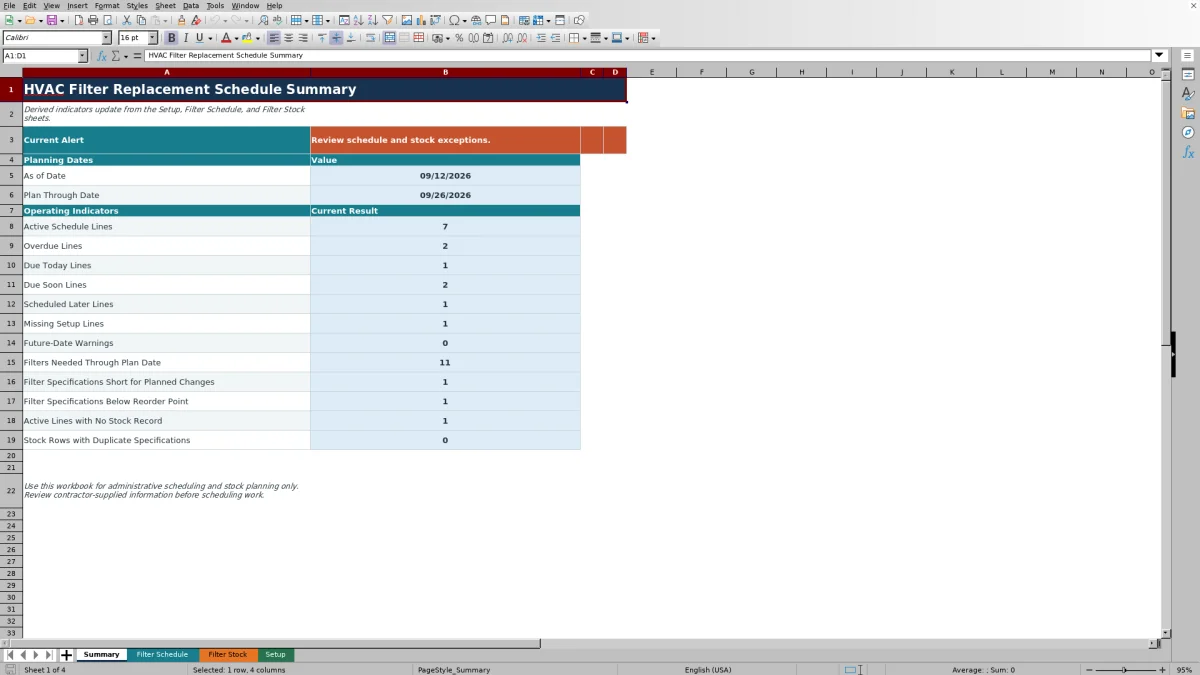
This editable Excel workbook connects filter replacement dates with stock planning so service staff can review due work and filter availability in one file.
Use it for administrative scheduling based on contractor-supplied information. It does not select filter ratings, establish service intervals, size equipment, or certify code compliance.
How this template can help
- Organizes replacement schedules by site, unit tag, area served, filter specification, and service interval.
- Separates overdue, due-today, due-soon, scheduled-later, inactive, and incomplete schedule lines.
- Totals filter demand for the planning window and compares it with recorded on-hand quantities.
- Provides a summary of schedule exceptions, stock shortages, missing stock records, and duplicate specifications.
What the workbook contains
How to get started
1. Set the planning dates
Open Setup and enter the As of Date in MM/DD/YYYY format. Enter 0 to 90 Plan Ahead Days to define the planning window. The Summary sheet calculates Plan Through Date by adding those days to the as-of date.
2. Enter filter stock
On Filter Stock, use one row per specification. Enter nominal width, height, and thickness in inches, MERV rating, filter style, On Hand, and Reorder Point. The sheet creates the specification description used to match inventory with scheduled units.
3. Build the unit schedule
On Filter Schedule, enter contractor-supplied values for Active, Site, Unit Tag, filter dimensions, MERV rating, style, Filters per Change, Replacement Frequency, and Last Replaced Date. Preserve the calculated columns from Next Due Date through Stock Alert.
4. Review and update the plan
Use the row 5 filters to isolate schedule statuses or stock alerts. Review the Summary exception counts, then confirm dates and inventory before assigning work or obtaining filters. After completed service, update Last Replaced Date and manually adjust On Hand to reflect actual usage.
Turn Replacement Dates Into a Service Queue
Each active schedule line uses Replacement Frequency (days) and Last Replaced Date to calculate Next Due Date. Days Until Due is the next due date minus the Setup as-of date. A negative result means the line is overdue, zero means it is due today, and a positive result shows how many days remain.
The Schedule Status then separates work into Overdue, Due today, Due soon, or Scheduled later. Due soon covers dates through the calculated Plan Through Date. A line marked No is Inactive, while a blank Active field does not create an active schedule line.
Use these results to decide which filter changes belong in the current service plan. The Summary Current Alert is an exception message rather than a reminder system. Due-today or due-soon work by itself does not trigger that exception message, so review the individual status counts even when the alert says there are no current exceptions.
Connect Planned Changes With Filter Stock
The schedule and stock sheets use exact specification matching. Width, height, thickness, MERV rating, and filter style are combined into a description such as 20 x 25 x 2 inches, MERV 11, Pleated. A matching Filter Stock row lets the schedule display that specification's stock status.
Needed Through Plan Date adds Filters per Change for matching active lines that are overdue, due today, or due soon. Remaining After Planned Changes equals On Hand minus planned demand. The stock status is Short for planned changes when on-hand quantity is below demand. If demand is covered but the remaining quantity is below the Reorder Point, the status is Below reorder point.
Suggested Restock Quantity is the greater of zero or planned demand plus reorder point minus on-hand quantity. Treat it as a planning result. Confirm physical counts, supplier pack quantities, lead times, and approved purchasing procedures before placing an order.
Worked Filter Planning Scenario
Fictional example: Set As of Date to 09/12/2026 and Plan Ahead Days to 14. The workbook calculates a Plan Through Date of 09/26/2026.
Pine Street Clinic AHU-3 uses two 20 x 25 x 2-inch, MERV 11, pleated filters per change. Its last replacement was 08/20/2026 with a 30-day frequency. The calculated next due date is 09/19/2026, seven days after the as-of date, so the line is Due soon. A second active unit using one filter of the same specification is due on 09/26/2026. Planned demand for that specification is therefore three filters.
If Filter Stock shows two on hand and a reorder point of four, Remaining After Planned Changes is -1. Stock Status is Short for planned changes, and Suggested Restock Quantity is five: three needed plus four for the reorder level minus two on hand. The next decision is to verify the shelf count and both unit specifications, then determine whether five filters should be obtained before the planned visits.
Resolve Schedule and Stock Errors
Use the workbook's exception labels to identify the input that needs review:
- Setup missing means the Setup as-of date or plan-ahead value is blank. Complete those fields before relying on due statuses.
- Missing setup on a schedule line means an active record lacks required information such as site, unit tag, filter dimensions, MERV rating, style, quantity per change, frequency, or last replacement date.
- Check future date means Last Replaced Date is later than the as-of date. Verify which date is wrong rather than changing it only to clear the warning.
- Not stocked means the generated schedule specification does not have an exact match on Filter Stock. Compare all dimensions, MERV rating, and style.
- Stock data missing means a stock specification exists without valid On Hand or Reorder Point information.
- Duplicate specifications means more than one stock row has the same generated specification. The Summary counts affected rows, and schedule lookups use the first match, so verify quantities and consolidate the records.
Do not treat a cleared warning as proof that the field information is correct. Compare the entry with the contractor's service record, equipment information, and physical stock count.
Run a Repeatable Planning Routine
Choose a consistent planning date, update Setup, and review Overdue before Due today and Due soon. Filter the schedule by Site, Schedule Status, or Stock Alert to prepare a practical service list. Then review Filter Stock for shortages and below-reorder results before assigning filters to jobs.
After service, enter the actual replacement date rather than the originally planned date. Adjust On Hand for the filters actually used, including any damaged or unused material handled under your normal inventory procedure. The next due date and planning demand will then update from the revised entries.
This XLSX does not maintain a change history, create work orders, or send reminders. If prior schedules are operationally important, save a dated copy before changing completed-service dates, inventory balances, or planning assumptions.
Workbook Comparison With Other Scheduling Methods
| Criterion | HVAC Sheets workbook | Blank spreadsheet | Field-service management system |
|---|---|---|---|
| Due-date logic | Prepared calculations for next due date, days remaining, and planning status | Formulas and status rules must be designed and maintained | Capabilities depend on system configuration |
| Stock planning | Matches scheduled demand to filter specifications and recorded stock | Requires custom matching and inventory formulas | Inventory functions vary by system and selected modules |
| Capacity | 150 prepared schedule lines and 100 prepared stock records | User-defined | System-dependent |
| Shared workflow and automation | Editable XLSX without messaging, live synchronization, or automatic work orders | Depends on how the file is stored and built | May support broader shared workflows or integrations, depending on the system |
| Practical fit | Administrative planning for a defined list of units and filter stock | Highly customized tracking when someone can build and maintain the logic | Operations that need system-based dispatch, mobile, or multiuser functions |
Choose this workbook when a structured Excel schedule and stock-planning file meets the team's process. Use a blank spreadsheet when the required workflow is materially different and custom design effort is available. Evaluate a field-service management system when real-time coordination, messaging, mobile access, or integrations are required.
Know the Workbook's Operational Limits
This workbook uses administrative dates, intervals, specifications, and stock counts supplied by the contractor. It does not determine the correct replacement frequency or MERV rating, evaluate pressure drop, verify equipment compatibility, inspect installed filters, or document regulatory compliance.
The stock calculation is a planning balance rather than a live inventory count. Purchases, receipts, transfers, damaged filters, and field use must be entered through the contractor's separate procedures and reflected manually in On Hand.
Limit stored information to what the schedule requires. Use appropriate internal site and unit identifiers, and avoid entering property-access codes, customer payment details, unnecessary contact information, or other sensitive records in Notes. Store and share the XLSX according to the company's access and retention practices.
Frequently asked questions
How does the workbook define a due-soon filter change?
A valid active line is Due soon when its calculated Next Due Date falls after the Setup As of Date and on or before Plan Through Date. Plan Through Date equals As of Date plus Plan Ahead Days.
What do blank or zero calculated results mean?
A zero in Days Until Due means the filter is due today. Blank calculated cells generally mean the line is inactive, required inputs are incomplete, or Setup is missing. A blank Filter Specification usually indicates that one or more dimensions, the MERV rating, or the style is missing.
Does this schedule determine the correct filter or replacement interval?
No. Enter filter dimensions, style, MERV rating, and replacement frequency from qualified contractor-supplied information. The workbook schedules from those entries but does not prescribe filtration, assess equipment performance, or replace engineering, safety, code, or manufacturer review.
Can I add more than 150 schedule lines or 100 stock records?
The prepared formulas, validations, filters, lookups, and summary ranges cover schedule rows 6 through 155 and stock rows 6 through 105. Rows added beyond those ranges are not automatically included. Expansion requires careful revision of formulas, validation ranges, filters, lookups, and summary calculations.
What should be updated after a filter replacement?
Enter the actual completion date in Last Replaced Date and adjust the matching stock row's On Hand quantity for actual usage. Review the recalculated next due date and stock status. Save a dated copy first if the business needs to retain the prior schedule, because this workbook does not keep version history.
Editorial responsibility

Mara KeeneService operations editor

Owen CalderEstimating and controls editor