This HVAC equipment markup calculator is an Excel workbook for comparing equipment and labor pricing under three editable scenarios.
Use the XLSX for a pricing comparison before transferring an approved amount to a customer quote.
How this template can help
- Compare markup-based and target-gross-margin prices for each quote line.
- Combine equipment and calculated labor costs before reviewing the suggested price.
- Test the same quote costs against three editable pricing scenarios.
- Identify incomplete inputs, cost concerns, pricing gaps, and low-margin lines.
What the workbook contains
How to get started
1. Save a working copy
Work from a copy of the original XLSX. The included entries are fictional examples. Clear or replace the editable inputs in columns A through N on Quote Lines without deleting the formulas in columns O through X.
2. Update the pricing assumptions
Review assumptions first on the Assumptions worksheet. For each of the three scenarios, enter the equipment markup, target gross margin, labor cost per hour, and labor markup that apply to your internal quote review. The worksheet also supplies lists used by fields such as Status, Unit, Responsibility, Pricing Basis, and Technician.
3. Enter each quote line
On Quote Lines, enter the quote date, customer, job, equipment, description, quantity, unit, technician, responsibility, status, scenario, pricing basis, unit equipment cost, and labor hours. Select either Markup or Gross Margin in Pricing Basis to control which calculated amount becomes Suggested Price.
4. Review calculations before quoting
Read Equipment Cost, Labor Cost, Total Cost, Markup Price, Margin Price, Suggested Price, Gross Profit, Gross Margin, Effective Markup, and Check across the line. Do not quote from an unresolved line. Then use Summary to review aggregate costs, pricing, profit, margin, and scenario comparisons.
Markup and Gross Margin Serve Different Pricing Decisions
Markup and gross margin are not interchangeable. The workbook calculates both so an estimator can see how the selected method changes the proposed price.
For markup pricing, the workbook applies the selected scenario’s equipment markup to Equipment Cost and its labor markup to Labor Cost. For gross-margin pricing, it divides Total Cost by one minus the scenario’s Target Gross Margin. Pricing Basis then selects either Markup Price or Margin Price as Suggested Price.
Gross Profit is Suggested Price minus Total Cost. Gross Margin is Gross Profit divided by Suggested Price, while Effective Markup is Gross Profit divided by Total Cost. Review the percentages by their labels rather than treating them as equivalent measures.
How Quote-Line Inputs Become a Suggested Price
Each prepared row on Quote Lines starts with operational details in columns A through N. Quantity multiplied by Unit Equipment Cost produces Equipment Cost. Labor Hours multiplied by the selected scenario’s Labor Cost / Hour produces Labor Cost. Those two amounts are added to produce Total Cost.
Scenario determines which assumptions the row uses. Pricing Basis determines whether Suggested Price takes the markup result or the target-margin result. The workbook still displays both calculated prices, which lets the estimator compare them before choosing the amount used for gross-profit and gross-margin reporting.
Validated lists help keep scenario, status, unit, responsibility, pricing basis, and technician entries consistent within the prepared range. Pasted or manually altered values still require review because a spreadsheet list does not verify job scope or supplier cost.
Worked HVAC Equipment Pricing Scenario
Fictional example: Assume a draft line dated 09/15/2026 contains one sample heat pump equipment set costing $4,000 and 12 labor hours. The selected Standard scenario uses a 28% equipment markup, a 35% target gross margin, labor cost of $38 per hour, and a 30% labor markup.
- Equipment Cost is 1 × $4,000, or $4,000.
- Labor Cost is 12 × $38, or $456.
- Total Cost is $4,000 + $456, or $4,456.
- Markup Price is $4,000 × 1.28 plus $456 × 1.30, or $5,712.80.
- Margin Price is $4,456 divided by 0.65, or $6,855.38.
The markup result produces a gross margin of about 22.0%, below the fictional 35% target. If Pricing Basis is Gross Margin, Suggested Price becomes $6,855.38 and calculated Gross Profit is $2,399.38. The $1,142.58 difference between the two pricing methods should prompt a review of scope, cost coverage, and company pricing policy before the quote is issued.
Reading the Summary and Scenario Results
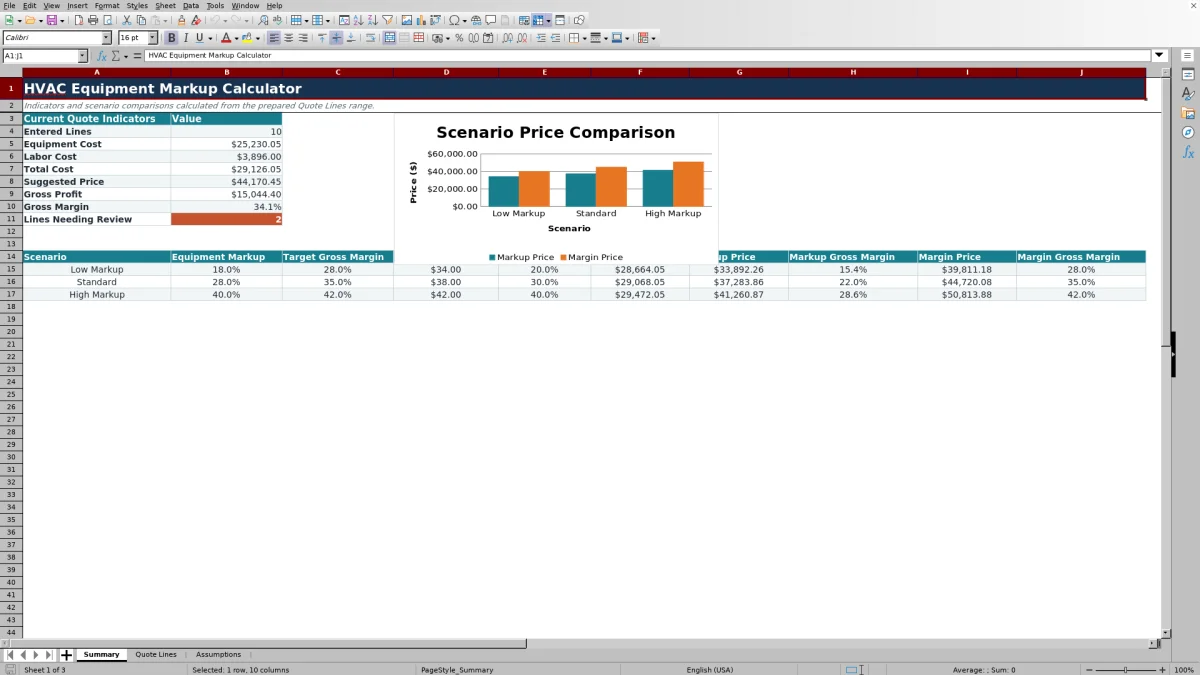
Summary consolidates Equipment Cost, Labor Cost, Total Cost, Suggested Price, Gross Profit, Gross Margin, and the number of lines with text in Check. These current-quote indicators use the line-specific scenarios and pricing bases selected on Quote Lines.
The lower comparison area applies each of the three assumption sets to the aggregate equipment cost and labor hours. It shows Scenario Cost, Markup Price, Markup Gross Margin, Margin Price, and Margin Gross Margin. The chart compares markup and margin prices across those scenarios.
Entered Lines counts numeric dates in the Quote Date column. If no valid Excel dates are present, the Summary totals remain blank even when other cells contain entries. Enter a valid date in Quote Lines before treating a blank Summary as a zero-dollar result.
Common Errors and Practical Corrections
The Check column is a review prompt, not an automatic approval or alert. Address the displayed condition before using Suggested Price:
- Check inputs means at least one required entry from Quote Date through Labor Hours is blank. Complete the row or clear the unused inputs.
- Check cost inputs can indicate a nonpositive quantity, a unit equipment cost below the configured minimum, or negative labor hours. Confirm the source figures and correct the input.
- Check pricing means the selected values did not produce a Suggested Price. Confirm that Scenario matches one of the three assumption names and Pricing Basis is Markup or Gross Margin.
- Margin check means the calculated Gross Margin is below the review threshold referenced from Assumptions. Recheck costs, scope, and the selected pricing method rather than simply overriding the result.
Zero labor hours are permitted and produce $0 labor cost. That can be valid for an equipment-only line, but it should be verified because the workbook does not know whether labor was accidentally omitted.
Workbook Comparison for Quote Pricing
| Criterion | This Excel workbook | Blank spreadsheet | Estimating platform |
|---|---|---|---|
| Initial structure | Prepared quote fields, formulas, scenarios, and review checks | User must design the layout and formulas | Depends on the selected product and configuration |
| Pricing comparison | Displays markup and target-margin prices for each prepared line | Available only if the user builds both methods | May be available depending on product features |
| Line capacity | 100 prepared rows | Determined by the user’s design | Determined by the product and plan |
| Workflow | Manual Excel entry and file-based review | Manual entry unless separately configured | May include broader workflow functions |
| Best fit | Focused internal pricing review in a familiar XLSX | Fully custom calculations built and maintained in-house | Organizations that need features beyond a standalone workbook |
Choose this workbook when the immediate task is comparing equipment markup and gross-margin pricing in Excel. Choose a blank spreadsheet when a qualified user needs complete control over the design. Evaluate an estimating platform when centralized workflow, permissions, or other functions outside this XLSX are required.
Workbook Limits, File Control, and Quote Handoff
The workbook’s prepared calculation and validation range ends at row 105 on Quote Lines. It is not formatted as an Excel table, so adding rows beyond that point may require formulas, validation, formatting, and the filter range to be extended carefully.
Total Cost includes the workbook’s Equipment Cost and calculated Labor Cost. It does not provide separate fields for overhead, permits, freight, tax, financing, subcontractors, or other job costs. If those amounts matter to the quote, account for them through a reviewed process rather than assuming the displayed gross margin includes them.
This XLSX does not size HVAC equipment, verify installation requirements, certify code compliance, obtain supplier prices, send quotes, or process payments. Its results depend on the costs, hours, assumptions, and selections entered by the user.
Protect the working file. Limit access to customer, employee, equipment, and pricing information, and retain an identified copy when assumptions or approved quote figures change.
Frequently asked questions
Does the workbook calculate both markup and gross-margin pricing?
Yes. Each prepared quote line calculates a Markup Price and a Margin Price. The Pricing Basis selection determines which one becomes Suggested Price. The workbook also calculates the resulting Gross Profit, Gross Margin, and Effective Markup.
What costs are included in Total Cost?
Total Cost is Equipment Cost plus Labor Cost. Equipment Cost is quantity multiplied by unit equipment cost. Labor Cost is labor hours multiplied by the selected scenario’s labor cost per hour. Other cost categories are not separately calculated by this workbook.
Why are the Summary totals blank?
Summary uses the count of numeric Quote Date entries to determine whether lines have been entered. If Quote Date is blank, stored as unrecognized text, or otherwise not treated as an Excel date, the Summary indicators can remain blank. Correct the date entry before interpreting the result.
How many quote lines are prepared?
Quote Lines contains 100 prepared rows, from row 6 through row 105. Those rows contain the formulas and validation used by the workbook. Extending the range requires careful review because new rows may not inherit every formula, validation rule, format, or filter setting automatically.
Can the Suggested Price be sent directly to a customer?
Suggested Price is an internal calculation for review. Confirm equipment cost, labor hours, scope, exclusions, and any costs not represented in the workbook before transferring an approved amount to a customer-facing quote. The XLSX does not create or send the customer quote.
Editorial responsibility

Mara KeeneService operations editor

Owen CalderEstimating and controls editor