This HVAC gross margin pricing calculator is an editable Excel workbook for turning estimated direct cost and target gross margin into a recommended selling price.
Use it to check a proposed quote, identify records that need attention, and review pricing totals before deciding whether an estimate is ready to issue.
How this template can help
- Turns material, labor, and other direct-cost inputs into a selling-price starting point.
- Shows how a proposed quote compares with the target gross margin.
- Keeps contractor-selected pricing assumptions separate from individual estimates.
- Rolls entered records into totals and review counts for office follow-up.
What the workbook contains
How to get started
1. Save a working copy
Work from a clean copy so the original formulas and prepared rows remain available. Replace the fictional sample inputs in the orange cells, but do not delete or overwrite calculated columns.
2. Review the Assumptions sheet
Update the direct labor cost per hour, target-margin reference, near-target tolerance, quote review threshold, allowed dates, and input ceilings as needed. You can also edit the prepared technician-rate, unit, status, and responsibility lists. The default target in Assumptions is a visible starting point; enter the selected target for each estimate in Pricing under Target Gross Margin.
3. Enter the estimate inputs
Enter only the intended input cells on Pricing. Provide an Estimate Date, job details, quantity, unit, Material Unit Cost, Labor Hours, technician, Other Direct Cost, and Target Gross Margin. Leave Quoted Price blank until a proposed selling price is available.
4. Review the price and record the decision
Check Total Direct Cost, Recommended Price, Quoted Gross Margin, Margin Variance, and Margin Check. Enter the proposed amount under Quoted Price, then assign Responsibility and Status manually. Review before quoting, especially when the result is below target, outside normal scope, or above the contractor-selected review threshold.
How the gross margin price calculation works
Total Direct Cost combines quantity multiplied by Material Unit Cost, Labor Hours multiplied by Labor Cost Rate, and Other Direct Cost. The technician selected in Pricing is used to look up a labor cost rate from Assumptions. If a listed rate is not found, the default direct labor cost per hour is used.
Recommended Price equals Total Direct Cost divided by one minus Target Gross Margin. For example, a $4,000 direct cost at a 40% target produces $4,000 ÷ 0.60, or $6,666.67.
Gross margin is not markup. Adding 40% to a $4,000 cost would produce $5,600, but that price has a gross margin of only 28.6%. The workbook uses the selling-price formula needed to make direct cost equal to the remaining 60% of revenue.
Worked HVAC pricing scenario
Consider a fictional replacement estimate dated 09/10/2026. Add “Casey Demo” to an available technician row on Assumptions with a $100 direct labor cost per hour, then select that technician on Pricing.
- Quantity: 1
- Material Unit Cost: $2,400
- Labor Hours: 15
- Labor Cost Rate: $100 per hour
- Other Direct Cost: $100
- Target Gross Margin: 40.0%
- Quoted Price: $6,500
The material amount is $2,400, labor cost is $1,500, and other direct cost is $100. Total Direct Cost is therefore $4,000. Result: Recommended Price is $6,666.67, while the $6,500 quote returns a Quoted Gross Margin of about 38.5% and a Margin Variance of about -1.5 percentage points.
With the workbook’s sample near-target tolerance of 2 percentage points, the Margin Check is Near target. The next decision is to raise the quote to at least $6,666.67 or review the scope, direct-cost inputs, and selected target before intentionally using the lower amount.
Use margin checks and summary indicators together
The calculated Margin Check classifies a priced record as Meets target, Near target, or Below target. A row with no Quoted Price is marked Needs quote. Check inputs appears when the workbook cannot make a valid comparison from the available direct cost, target, and quote.
Status is a separate editable field; it does not change automatically with the margin result. Use Responsibility and Status to document who should review the estimate and its current stage without treating those entries as pricing approval.
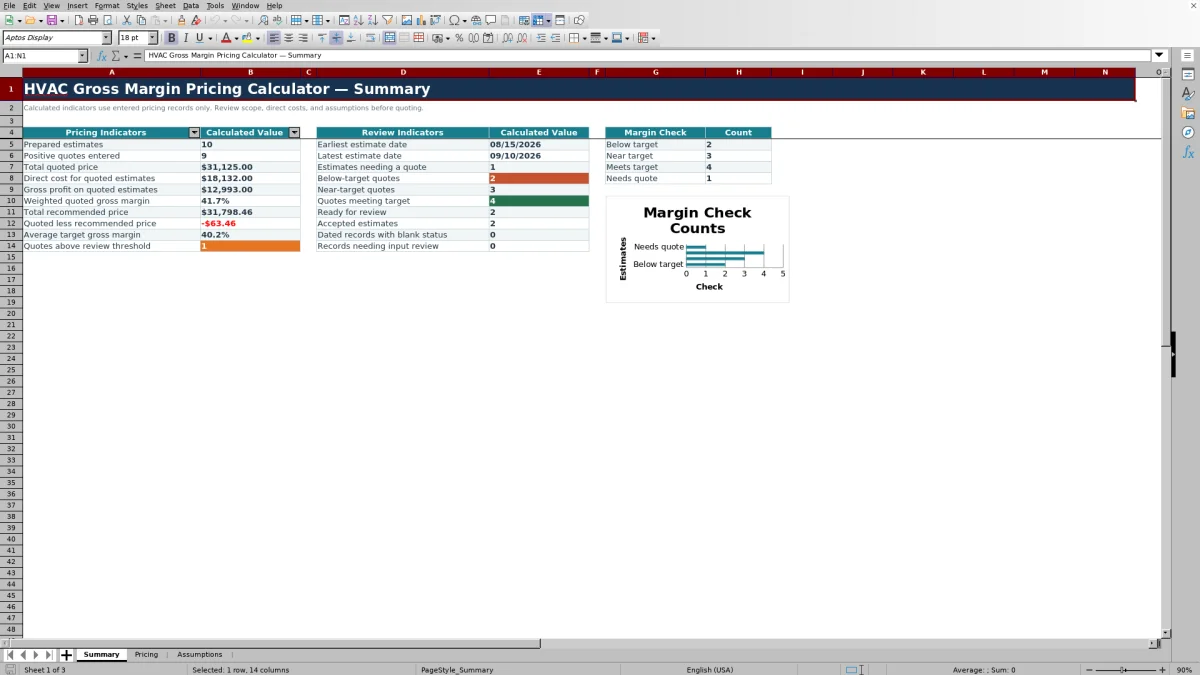
On Summary, weighted quoted gross margin is total gross profit divided by total positive quoted price. This differs from a simple average because larger quotes have more influence. The sheet also reports total recommended price, quoted price less recommended price for positively quoted records, status counts, records needing input review, and margin-category counts. Its chart displays counts by margin-check category rather than dollar value.
Common pricing errors and practical corrections
- Do not force a number when Total Direct Cost is blank. Enter the Estimate Date first, then check that Quantity and Material Unit Cost are either both completed or both blank. Confirm that at least one valid direct-cost component is present.
- If the row says Needs quote, enter a proposed selling price in Quoted Price or leave the record for later follow-up.
- If the row says Check inputs, review Total Direct Cost and Target Gross Margin. A zero quoted price does not produce a quoted gross margin and is not counted as a positive quote on Summary.
- If the labor rate is unexpected, check the selected technician and the technician-rate list on Assumptions. An unsuccessful lookup uses the default direct labor cost per hour.
- If Excel rejects an entry, compare it with the allowed date range and the maximum quantity, labor-hour, margin, cost, and price assumptions.
- If a calculated cell was overwritten, return to a clean workbook copy rather than manually reconstructing formulas during an active estimate.
Set assumptions without hiding estimate-level decisions
The Assumptions sheet starts with a $98 default direct labor cost per hour, a 40% default target-margin reference, an 80% maximum target margin, a 2-percentage-point near-target tolerance, and a $10,000 quote review threshold. These are editable workbook settings, not recommended business standards.
The prepared validation range also limits estimate dates to 01/01/2025 through 12/31/2028, quantity to 10,000, labor hours to 1,000, and individual cost or price entries to $250,000. Review these values before entering live work. A validation ceiling is a data-entry guardrail, not confirmation that an amount is commercially appropriate.
The quote review threshold identifies prices above the selected amount for review; it does not approve or reject them. Likewise, the maximum target margin prevents entries above the selected ceiling but does not establish the right target for a particular job.
Comparison with other pricing approaches
| Criterion | This Excel workbook | Blank spreadsheet | Estimating or field-service system |
|---|---|---|---|
| Pricing logic | Prepared direct-cost, recommended-price, quoted-margin, and variance formulas | Formulas and controls must be designed and tested by the user | Available calculations depend on the selected system and configuration |
| Review workflow | Margin checks, responsibility, manual status, summary counts, and one chart | Must be created by the user | Workflow options vary by system |
| Prepared capacity | 100 pricing rows in the verified range | Depends on how the file is built | Depends on the selected system and plan |
| Other operations | No verified dispatching, invoicing, messaging, payment, or live-system functions | None unless separately built | Confirm required functions directly with the system provider |
| Practical fit | File-based estimate pricing and margin review | Highly customized calculations when someone can build and maintain them | Broader connected workflows when supported features justify the setup |
Choose this workbook when the immediate need is a controlled Excel calculation for a limited set of pricing records. Start from a blank spreadsheet when the calculation must be substantially different. Consider a dedicated system when shared records, larger volume, or connected operational functions are required and have been verified.
Workbook limits and record handling
The workbook treats one pricing record per row. It does not group several rows by Job into one recommended selling price, and Summary counts dated rows rather than unique job numbers. For a complex estimate, consolidate the direct-cost inputs into one row or carefully adapt a separate copy without assuming repeated job numbers will be combined.
Gross margin is calculated only from the direct costs entered in Pricing. The workbook has no verified fields for actual job costs, overhead allocation, tax treatment, collections, or net profit. It also does not size HVAC equipment, validate field conditions, certify a design, or establish code or safety compliance.
Rows 7 through 106 are the verified prepared range. Records added outside that range are not covered by the documented formulas, validation, filters, or Summary references unless the workbook is deliberately extended and checked.
Customer names, employee rates, equipment details, and prices can be sensitive. Store the XLSX under appropriate access controls, limit unnecessary copies, and remove fictional or live records before sharing the file outside the intended team.
Frequently asked questions
Can I change the target gross margin for each estimate?
Yes. Enter the selected percentage in the Pricing sheet’s Target Gross Margin field for that row. Assumptions provides a default target-margin reference and a maximum allowed target, but each prepared pricing row retains an editable target field.
Why is the recommended price higher than cost plus the margin percentage?
The workbook calculates gross margin as a percentage of selling price, not as a markup on cost. Recommended Price equals Total Direct Cost divided by one minus Target Gross Margin. A 40% target means direct cost should represent 60% of the selling price.
Can I enter several rows for the same job?
You can repeat a job identifier, but the verified formulas treat every row as a separate pricing record. The Summary sheet does not consolidate rows by Job and counts prepared estimates from entered dates. Use one consolidated row when you need one job-level recommended price, or adapt and test a separate workbook copy.
Does Margin Check update the estimate status?
No. Margin Check is calculated from direct cost, target margin, quoted price, and the near-target tolerance. Status and Responsibility are separate editable list fields that staff must update as part of their review process.
Does the calculator compare estimated costs with actual job costs?
No. The Pricing sheet contains estimated direct-cost inputs and a quoted selling price, but it has no verified actual-cost fields. Use a separate job-costing record or accounting workflow for estimate-to-actual analysis.
Editorial responsibility

Mara KeeneService operations editor

Owen CalderEstimating and controls editor