This editable Excel workbook organizes the equipment and service items used to prepare a commercial HVAC maintenance proposal.
Use the XLSX to define annual visit frequency, estimate labor and material costs, separate included and optional work, and review the proposed annual price.
How this template can help
- Connects each proposal line to an equipment record and its planned service frequency.
- Calculates annual labor hours, direct cost, proposed price, and gross margin from editable planning inputs.
- Separates included, optional, excluded, and draft scope for proposal review.
- Identifies missing visits, missing prices, markup exceptions, and unassigned included assets.
What the workbook contains
How to get started
1. Update the proposal assumptions
Start on the Assumptions sheet. Replace fictional entries for the customer, job or site, proposal date, proposed start date, and preparer. Review the default labor rate, markup, frequency mappings, review thresholds, and choice lists before entering scope.
2. Build the equipment scope
On Equipment, enter one row for each asset record. Keep asset IDs unique, then complete the quantity, equipment description, service frequency, responsibility, status, assigned technician, and exclusions or notes. Visits / Year is looked up from the frequency mapping on Assumptions. Capacity is descriptive here; it does not size or approve equipment.
3. Enter the proposed services
On Proposal Items, connect each line to an Asset ID and enter the service description, quantity per visit, unit, labor hours per unit, and material cost per unit. Set responsibility and status, then document exclusions. Protect calculated columns such as Visits / Year, Annual Labor Hours, Labor Rate, Annual Direct Cost, Markup, and Annual Proposed Price unless you intentionally redesign the workbook.
4. Review the proposal totals
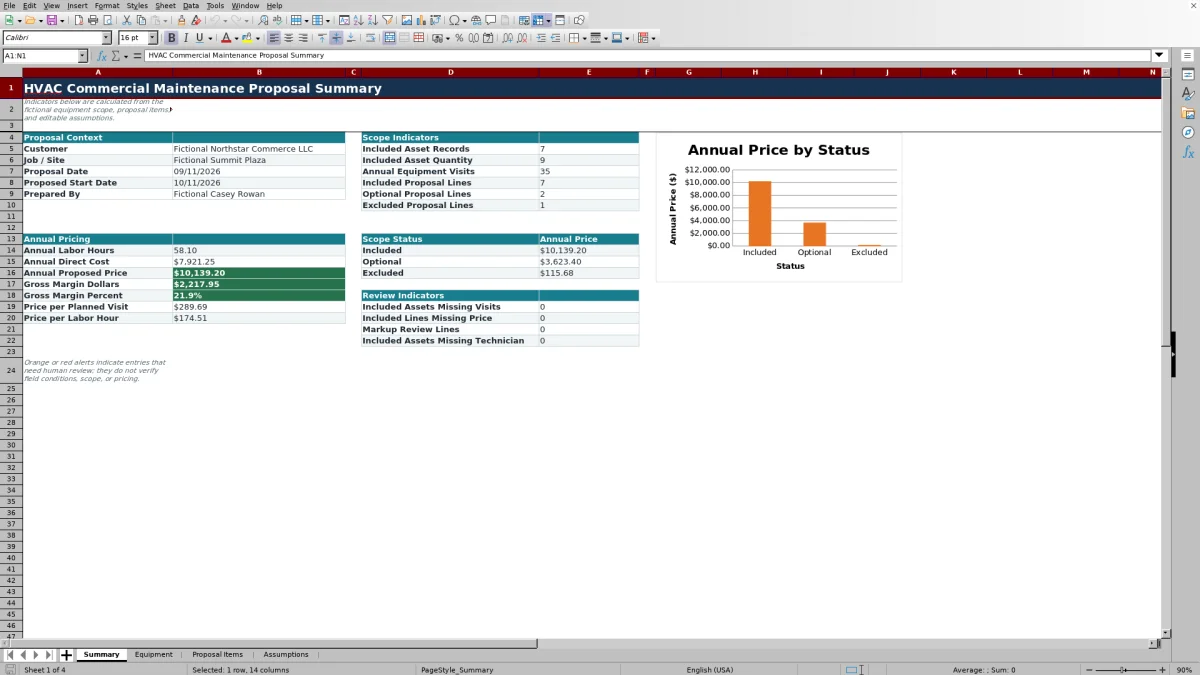
Review Summary last. Check included asset quantities, annual equipment visits, status totals, annual pricing, gross margin, and review indicators. Orange or red formatting calls for human review rather than confirming that the scope or price is correct. Because the XLSX has no dedicated version log, save an identified copy before changing an approved baseline.
Turn service frequency into an annual maintenance plan
The Equipment sheet converts the selected Service Frequency into Visits / Year using the mapping on Assumptions. The verified mappings include Monthly at 12 visits, Quarterly at 4, Semiannual at 2, and Annual at 1.
The Summary then multiplies each included equipment record's Quantity by Visits / Year. Three quarterly units, for example, contribute 12 annual equipment visits. Use that result to judge whether the planned service load matches the proposed scope before pricing is finalized.
If Asset ID or Service Frequency is blank, or if the frequency text does not match the mapped list, Visits / Year remains blank. An included asset with that condition appears in the missing-visits review count and contributes no visits to the annual total.
Understand the annual labor and pricing calculations
Each Proposal Items row turns per-visit inputs into an annual estimate. Annual Labor Hours equals Qty / Visit multiplied by Visits / Year and Labor Hours / Unit. Annual Direct Cost adds labor cost and material cost: annual labor hours multiplied by the default labor rate, plus quantity per visit multiplied by annual visits and material cost per unit.
Annual Proposed Price applies the row's markup to Annual Direct Cost. The Summary adds only lines marked Included to its main annual labor, direct-cost, and proposed-price figures. Optional and Excluded lines are totaled separately by status.
Direct cost in this workbook consists only of the labor and material terms in that formula. Travel, overhead, subcontractors, permits, taxes, and other costs are not separate calculated inputs. Decide how those items should be handled under your company's estimating and accounting practices before relying on the proposed price.
Worked commercial maintenance proposal scenario
Assume a completely fictional quarterly service line for one rooftop unit. The equipment quantity is 1, its frequency produces 4 visits per year, and both the equipment and proposal line are marked Included. The proposal line uses 1 unit per visit, 1.5 labor hours per unit, a $50.00 labor rate, $30.00 of material per unit, and a 25% markup.
Worked result: annual labor is 1 × 4 × 1.5, or 6 hours. Labor costs $300.00, and annual materials cost 1 × 4 × $30.00, or $120.00. Annual Direct Cost is therefore $420.00. Applying the 25% markup returns an Annual Proposed Price of $525.00.
If this is the only included asset and line, Summary shows $105.00 of gross margin dollars and a 20.0% gross margin percentage. It also returns $131.25 per planned visit and $87.50 per labor hour. Those ratios show how the entered price compares with the visit and labor plan; they do not prove that every job cost is covered. Review the omitted costs and scope assumptions before deciding whether to revise the inputs or keep the line included.
Coordinate status, responsibility, and exclusions
Equipment and Proposal Items have separate Status fields. Equipment status controls the included asset counts and annual equipment visits. Proposal-item status controls labor, cost, proposed price, and the Included, Optional, and Excluded price totals.
A proposal line can still retrieve visits from an Asset ID even when the related equipment row is not marked Included, because that lookup does not reconcile the two status fields. Before issuing a proposal, compare the statuses on both sheets. A Draft row is not included in the three displayed status totals.
Use Responsibility to distinguish contractor, customer, or shared work where applicable, and use Exclusions / Notes to state what the line does not cover. These entries document estimating intent; they do not establish legal responsibility, confirm site access, or replace reviewed proposal terms.
Resolve review indicators and common entry errors
Blank is not zero in several important parts of this workbook. Use the following checks when a result appears incomplete:
- If Visits / Year is blank, confirm that the equipment row has an Asset ID and a Service Frequency that exactly matches the Assumptions list.
- If Annual Proposed Price is blank, check the Line ID, matching Asset ID, quantity per visit, retrieved visits, labor hours, default labor rate, and material cost. Enter 0 for a known no-material-cost line rather than leaving Material Cost / Unit blank.
- If two equipment rows use the same Asset ID, the proposal lookup uses the first match. Assign a unique ID to each equipment record.
- If there are no included equipment records, included quantity and annual equipment visits display zero. If there are no included proposal lines, the main annual labor, cost, and price results remain blank. Ratio results also remain blank when the required denominator is missing or zero.
- If a line or quantity is highlighted, compare it with the editable review thresholds. The Summary also counts included lines above the markup threshold, included lines missing a price, included assets missing visits, and included assets missing an assigned technician.
Resolve the underlying input or document why the exception is intentional. The formatting and counts help focus review; they do not verify field conditions or commercial terms.
Workbook Comparison: prepared XLSX vs blank spreadsheet
The choice depends on whether you want a prepared annual-maintenance structure or need to design a completely different estimating method.
| Criterion | HVAC Sheets workbook | Blank spreadsheet |
|---|---|---|
| Starting structure | Four prepared sheets for assumptions, equipment, proposal items, and summary review | User designs the sheets, fields, and relationships |
| Annual calculations | Prepared formulas for visits, labor hours, direct cost, markup price, and summary ratios | User creates and tests the required formulas |
| Scope review | Status totals, missing-input counts, validations, and conditional formatting are included | Review rules must be designed separately |
| Customization | Editable, but changes must preserve fixed formula and validation ranges | Flexible from the outset, with no prepared maintenance workflow |
| Live operations | No dispatching, messaging, customer acceptance, or accounting posting | No live operations unless the user builds or connects them separately |
Choose this workbook when the prepared equipment-to-service-line workflow matches the proposal. Choose a blank spreadsheet when the pricing model or scope structure is materially different and someone can build and test the calculations.
Know the workbook's operational limits
Planning boundary: this workbook estimates and summarizes a proposed maintenance scope. It does not inspect equipment, confirm serial data, test system performance, size HVAC equipment, determine code requirements, certify maintenance procedures, or provide engineering approval.
An Assigned Technician entry is a planning field, not a dispatch assignment or availability check. The XLSX does not send reminders, create service calls, obtain customer acceptance, process payments, or post amounts to an accounting system.
Review access requirements, safety conditions, labor assumptions, parts, exclusions, and commercial terms with the appropriate people. Store the file securely, limit access, and avoid placing unnecessary customer, employee, property-access, equipment-serial, vendor, pricing, or payment details in descriptions and notes.
Frequently asked questions
Can I combine several customers or sites in one proposal workbook?
Equipment rows include Customer and Job / Site fields, but Summary pulls one proposal context from Assumptions and totals all rows marked Included. Mixing customers or sites could therefore combine unrelated scope and prices. For a clear commercial proposal, use a separate identified copy for each customer and site unless you intentionally redesign the summary.
Can I change the available service frequencies?
Yes. The frequency mapping is stored in Assumptions, and the Equipment lookup uses the existing mapping range. Keep each label unique and pair it with a numeric visits-per-year value. Adding choices beyond the prepared range requires corresponding changes to the lookup and validation setup; the range does not expand automatically.
Why does optional work not change the main annual proposed price?
The main Annual Pricing block on Summary totals Proposal Items marked Included. Optional and Excluded lines appear in separate status totals so they can be reviewed without changing the included base price. Change a line's status only after deciding that it belongs in the base maintenance scope.
Is the gross margin percentage the same as net profit?
No. The workbook subtracts its calculated Annual Direct Cost from Annual Proposed Price and divides that difference by price. It does not separately calculate overhead, financing costs, taxes, callbacks, unentered travel, or other operating expenses. Treat the result as a proposal-level planning indicator rather than net profit or an accounting determination.
Can this Excel worksheet serve as the final customer proposal?
It can support internal review and provide a structured summary of assets, service items, exclusions, and annual pricing. The verified workbook does not contain customer-acceptance, electronic-signature, delivery, payment-processing, or legal-terms functions. Review the scope and transfer or adapt approved information into your normal proposal process as needed.
Editorial responsibility

Mara KeeneService operations editor

Owen CalderEstimating and controls editor