This HVAC change order calculator is an editable Excel workbook for pricing a scope change against an original allowance. It keeps job details and pricing inputs in one row while calculating the proposed change price.
Use it when labor, materials, other costs, markup, and tax need internal review before a status is updated. The XLSX supports the pricing record; it does not approve the change or replace contract, tax, code, or engineering review.
How this template can help
- Shows the amount above or below the original allowance before markup and tax.
- Applies standard labor, markup, and tax defaults while allowing row-specific overrides.
- Keeps responsibility, status, pricing inputs, and calculated results together for each change.
- Surfaces incomplete, duplicate, out-of-range, or unusually large entries for human review.
What the workbook contains
How to get started
1. Set the workbook assumptions
Open Assumptions and replace the example labor rate, markup, sales tax rate, review thresholds, and allowed date range with values approved for your operation. Percentage entries use decimals, so 15% is entered as 0.15. Replace the fictional technician choices and revise the unit, responsibility, and status choices as needed.
2. Clear or replace the demonstration entries
The first rows on Change Orders contain clearly fictional examples. Replace or clear the input fields in columns A:S. Do not overwrite columns T:AA; those columns contain the labor, material, direct-cost, allowance, markup, tax, price, and alert formulas.
3. Enter one change order per row
Assign a unique Change Order ID and enter the date, customer, job, equipment, description, quantity, unit, labor hours, material unit cost, other cost, original allowance, taxable cost, responsibility, and status as applicable. Labor Rate Override, Markup % Override, and Tax Rate Override are optional. A blank override uses the corresponding default, while an entered zero applies a zero rate.
4. Review the calculated price
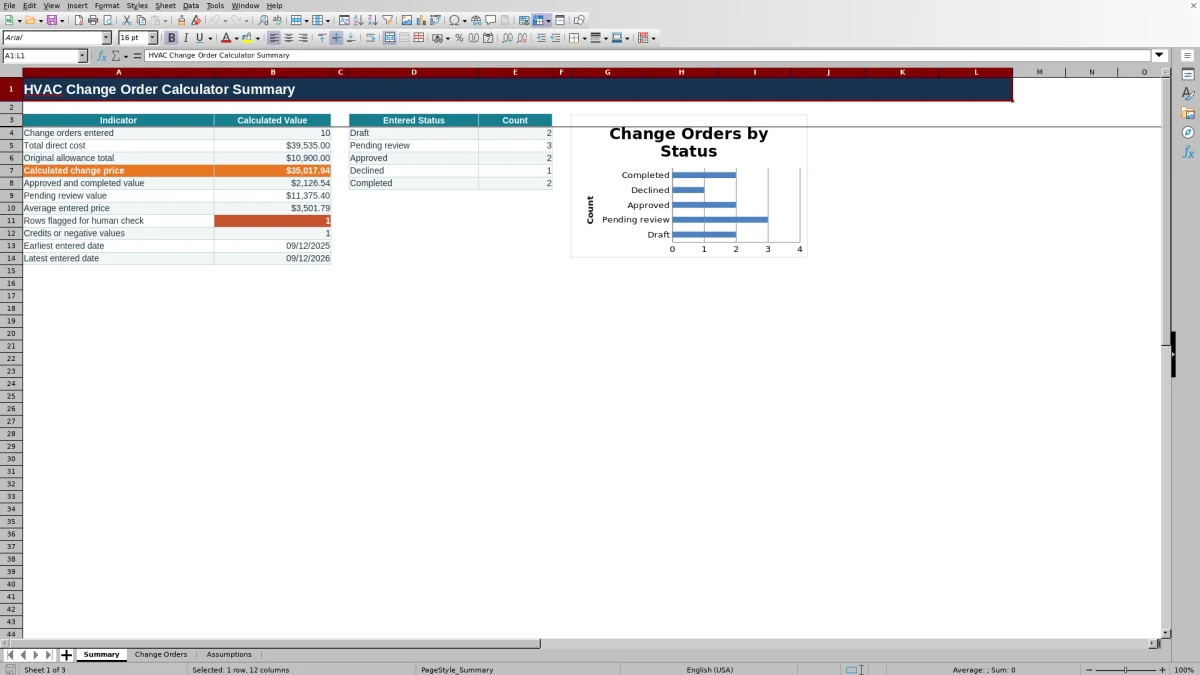
Check Allowance Variance, Change Order Price, and the Review Alert before changing the row's status. Then use Summary to review totals, status counts, pending-review value, negative prices, flagged rows, and the entered date range.
How the change order price is calculated
Labor Cost multiplies Labor Hours by the row's Labor Rate Override. If that override is blank, the formula uses Default labor rate from Assumptions. Material Cost multiplies Quantity by Material Unit Cost, and Direct Cost adds labor, material, and Other Cost.
The workbook calculates allowance variance as Direct Cost minus Original Allowance. Markup Amount equals that variance multiplied by the row override or default markup. Tax Amount is calculated separately as Taxable Cost multiplied by the override or default sales tax rate. Change Order Price adds the allowance variance, markup amount, and tax amount.
Markup therefore applies to the amount above or below the allowance, not the entire direct cost. Taxable Cost is a manual input rather than a result derived from Direct Cost. Confirm that both inputs follow the pricing method selected for the job before using the result.
Worked HVAC scope-change example
Assume a fictional duct revision requires 8 labor hours at the $95 default rate, 12 feet of material at $70 per foot, and $200 of Other Cost. Labor Cost is $760, Material Cost is $840, and Direct Cost is $1,800.
If the Original Allowance is $1,000, Allowance Variance is $800. A 15% default markup adds $120. If $840 is entered as Taxable Cost and the default tax rate is 7.25%, Tax Amount is $60.90. The resulting Change Order Price is $980.90: $800 variance plus $120 markup plus $60.90 tax.
The result is the calculated change against the allowance, not the revised total job price. The next step is to verify the scope, allowance, markup basis, and taxable amount. If the entry is ready for review, change Status from Draft to Pending review.
Using statuses and the Summary worksheet
The available statuses are Draft, Pending review, Approved, Declined, and Completed. They are manually entered statuses, not electronic approvals. Excel uses them to update the Summary counts, status chart, Pending review value, and combined Approved and completed value.
Summary also displays the number of change order IDs entered, total direct cost, original allowance total, calculated change price, average entered price, flagged-row count, negative-price count, and earliest and latest entered dates.
Several Summary financial results remain blank when no Change Order ID has been entered. A row without an ID can still calculate a price, and its amount can enter Summary totals once another row has an ID. Resolve missing-ID alerts so the displayed entry count and totals cover the same records.
Common entry errors and practical fixes
Summary values are blank: Check whether Change Order ID is blank on every active row. The Summary uses entered IDs to determine whether to display several totals.
Labor, markup, or tax is unexpected: inspect the corresponding override. A blank override uses the applicable Assumptions value, while zero intentionally applies a zero rate.
Tax Amount is blank or zero: enter Taxable Cost if tax should be calculated, and check whether Tax Rate Override contains zero.
Change Order Price is negative: Direct Cost may be below Original Allowance. The workbook treats the difference as a credit and includes negative prices in the Summary count.
Review Alert contains text: correct missing or duplicate IDs, missing or out-of-range dates, missing descriptions, missing statuses, or entries beyond the configured review thresholds. An alert requests a check but does not stop the calculation.
A date or percentage is rejected: compare the entry with the allowed date range, markup limits, and tax-rate limit on Assumptions.
Pricing and recordkeeping limits
This XLSX is not an approval or compliance record. It does not obtain signatures, send messages, maintain version history, submit regulatory records, process payments, or transfer entries to accounting or field-service software.
Each row provides one quantity, unit, material unit cost, labor-hours amount, and aggregate Other Cost. A change with several priced line items may need to be totaled before entry or handled in a carefully adapted copy. Reusing one Change Order ID on multiple rows triggers the duplicate-ID review message.
Save an identified copy before changing an accepted price or approved scope. Store files with appropriate access controls for customer, employee, equipment, property-access, and pricing information. The workbook performs arithmetic with the taxable cost and rate entered; it does not determine which costs should be taxable.
Comparison with paper and dedicated operational systems
| Operational criterion | HVAC Sheets Excel workbook | Paper change-order log | Field-service or estimating system |
|---|---|---|---|
| Pricing setup | Provides prepared fields for labor, materials, other cost, allowance, markup, taxable cost, and tax | Requires manual calculations or a separate calculator | Available pricing fields and methods depend on the selected system |
| Calculation controls | Includes formulas, editable defaults, row overrides, validation rules, and review alerts | Depends on manual checking | Controls and configuration depend on the selected system |
| Tracking capacity | Provides 100 prepared change-order rows with five entered statuses and Summary metrics | Capacity and summaries depend on the form and filing process | Record capacity and reporting depend on the selected system |
| Connected workflow | Operates as a standalone XLSX without messaging, signatures, payments, or software integrations | Operates outside software unless information is entered elsewhere | Connected workflow capabilities vary by product and configuration |
| Conditional fit | Suitable when a small team needs an editable Excel record and the allowance-based formula matches its pricing method | Suitable when change volume is low and manual calculation and filing are acceptable | Worth evaluating when connected records, electronic approvals, or other broader workflow capabilities are required |
Choose the workbook when its complete set of entry fields, calculations, checks, statuses, and Summary results fits the job process. Use a paper method only when manual controls are sufficient. Evaluate a dedicated system when requirements extend beyond this standalone workbook.
Adapting assumptions and dropdown choices
The included example settings are a $95 default labor rate, 15% default markup, 7.25% default sales tax rate, a 40-hour labor review threshold, a $15,000 absolute price review threshold, and an allowed date range of 09/12/2025 through 09/12/2027. These are editable starting values, not recommended prices or policies.
Assumptions also supplies the unit, technician, responsibility, and status choices used by Change Orders. Replace the fictional technician names before operational use. Keep new choices within the workbook's fixed validation ranges; adding entries beyond those prepared ranges may require changing the applicable validation rule.
The permitted markup and tax input ranges are validation boundaries, not pricing guidance. After editing defaults, limits, or lists, enter a fictional test row and confirm the labor cost, markup, tax, price, alert, status count, and Summary totals before using the file for active work.
Frequently asked questions
Can the Excel calculator record a change order credit?
Yes. If Direct Cost is lower than Original Allowance, Allowance Variance can be negative, which can produce a negative Change Order Price. Summary counts negative prices as credits or negative values. Review the markup and tax effects before treating that result as a customer credit.
Does the workbook automatically decide which costs are taxable?
No. Taxable Cost is entered manually. The workbook multiplies that amount by the Tax Rate Override or, when the override is blank, the default sales tax rate from Assumptions. It does not determine taxability or provide tax advice.
What is the difference between a blank override and a zero override?
A blank Labor Rate Override, Markup % Override, or Tax Rate Override tells the formula to use the applicable default from Assumptions. Entering zero applies a zero rate. Confirm that zero is intentional before relying on the calculated price.
Can one change order contain several material or labor line items?
The prepared calculation uses one row with one labor-hours value, one quantity, one material unit cost, and one Other Cost amount. Several items may need to be aggregated before entry or handled in an adapted copy. Using the same Change Order ID on multiple rows produces a duplicate-ID alert.
Does changing a row to Approved create an approval record?
No. Approved is an entered status used for Summary counts and values. The workbook does not collect signatures, send notifications, lock an approved baseline, or maintain an approval audit trail. Keep the supporting authorization and versioned records through your normal process.
Editorial responsibility

Mara KeeneService operations editor

Owen CalderEstimating and controls editor